 superterm▊5.2.2
La mejor consola de texto del mundo. Un escritorio completo al estilo Turbo Vision, con ventanas y paneles PTY reales, sesiones que siguen vivas y acceso desde cualquier lugar con un simple ssh.
The world's best text console. A complete Turbo Vision-style desktop with real PTY-backed windows, sessions that stay alive and access from anywhere with one ordinary ssh command.
# One command. Any standard SSH client.
$ ssh -p 8022 you@your-server

┌ editor ───────┐ ┌ logs ─────────┐
│ real PTY pane │ │ still running │
└───────────────┘ └───────────────┘

# Lose the network. Close the laptop.
# Reconnect and the exact live desktop is there.
$ ssh -p 8022 you@your-server

$ superterm --help ssh-server
$ superterm listar .  # bilingual automation

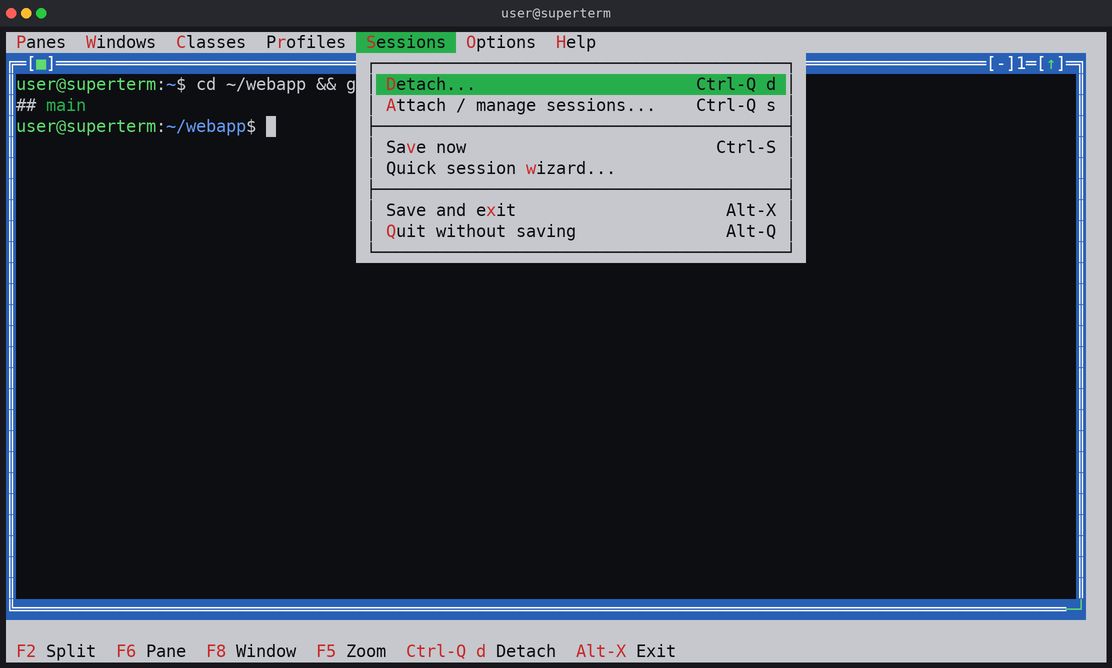
superterm está pensado para trabajar con varias shells locales y conexiones SSH remotas al mismo tiempo. Las sesiones se restauran solas, los perfiles con nombre describen espacios de trabajo repetibles, y el asistente de sesión levanta un espacio pequeño y puntual sin tocar ningún fichero de configuración.
superterm is designed for working with several local shells and remote SSH sessions at once. Sessions can be restored automatically, named profiles describe repeatable workspaces, and the session wizard launches a small ad-hoc workspace without editing a configuration file.
Desde la versión 3.0, cada sesión es un par cliente/servidor desde el momento en que arranca: la terminal que ves es sólo el primer cliente conectado. Eso convierte a superterm en mucho más que un gestor de ventanas para shells — todo el espacio de trabajo se puede gobernar desde cualquier otra shell, script, tarea de cron o herramienta de automatización.
Since 3.0, every session is a client/server pair from the moment it starts: the terminal you see is just the first attached client. That makes superterm far more than a window manager for shells — the entire workspace can be driven from any other shell, script, cron job or automation tool.
Divisiones verticales y horizontales, navegación del foco, foco con ratón, redimensionar, maximizar, minimizar, restaurar y cerrar.
Vertical and horizontal splits, focus navigation, mouse focus, resize, maximize, minimize, restore and close — up to 16 panes in one visible layout.
Estilo tmux: el terminal visible es sólo el primer cliente. [session] server=detach restaura el flujo clásico de sólo-detach.
tmux-style: the visible terminal is just the first attached client. [session] server=detach restores the classic detach-only flow.
Sesiones multiusuario reales: un único escritorio compartido, geometría, foco y contenido sincronizados, con control de flujo para que un cliente lento nunca bloquee al resto.
True multi-user sessions: one shared desktop with synchronized geometry, focus and content, plus flow control so one stalled client never blocks the rest.
Interfaz en inglés por defecto y en español seleccionable en tiempo de ejecución. La CLI acepta comandos y opciones en inglés y en español.
English interface by default, with a runtime-selectable Spanish interface. The control CLI accepts commands and flags in English and in Spanish.
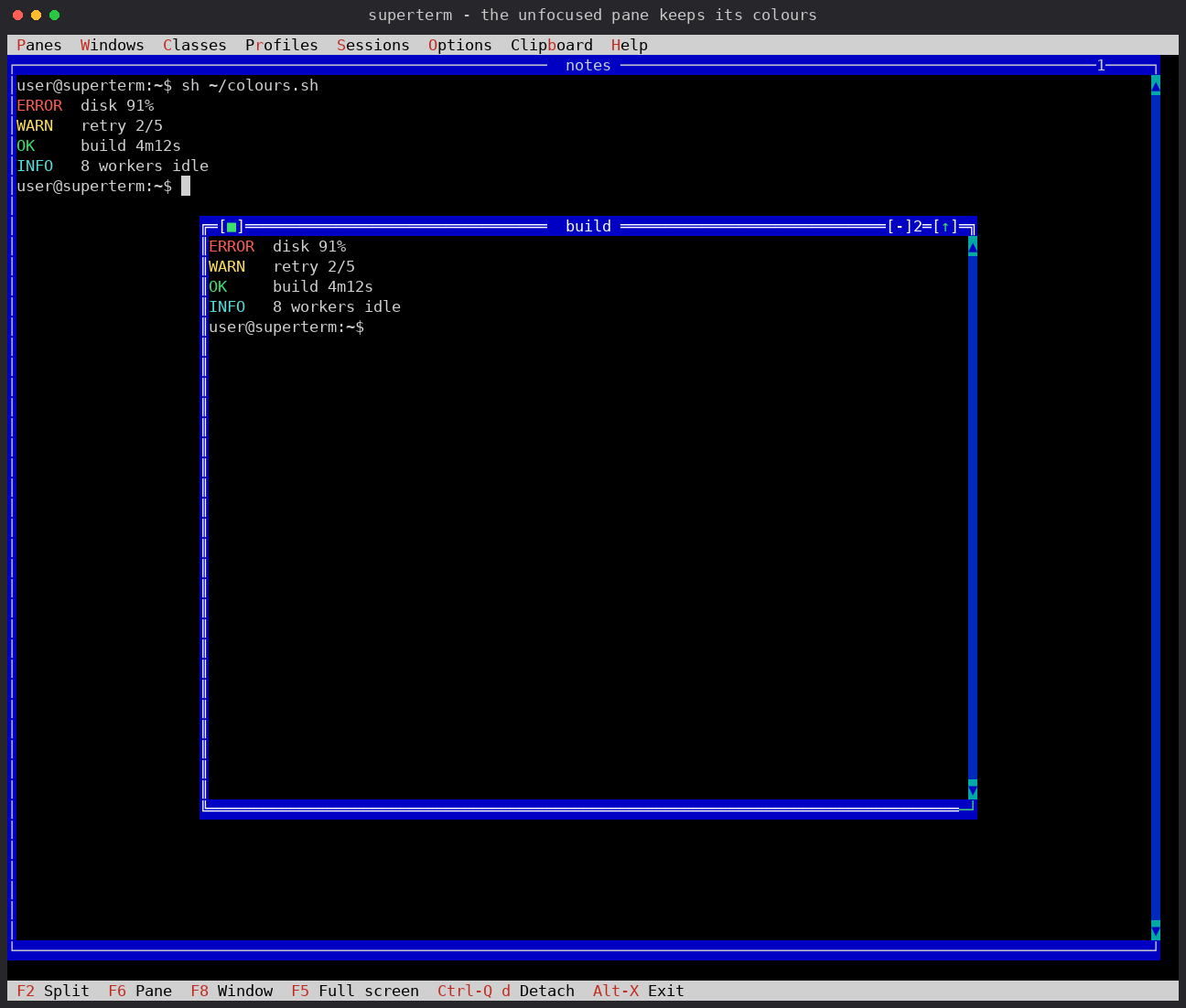
Truecolor y 256 colores llegan al terminal exactamente como los envió la aplicación, con glifos UTF‑8 reales, emoji a su ancho de dos columnas, marcas combinantes, atenuado y texto oculto.
Truecolor and 256-color sequences reach the terminal exactly as the application sent them, with real UTF-8 glyphs, emoji at true two-column width, combining marks, faint and concealed text.
Un Esc suelto llega al panel (por tiempo, no tratado como prefijo Alt), con decodificación CSI/SS3 y ratón X10/SGR. Prefijo configurable, por defecto Ctrl-Q.
A lone Esc reaches the pane (timeout-based, not treated as an Alt prefix), with CSI/SS3 decoding and X10/SGR mouse support. Configurable prefix key, Ctrl-Q by default.
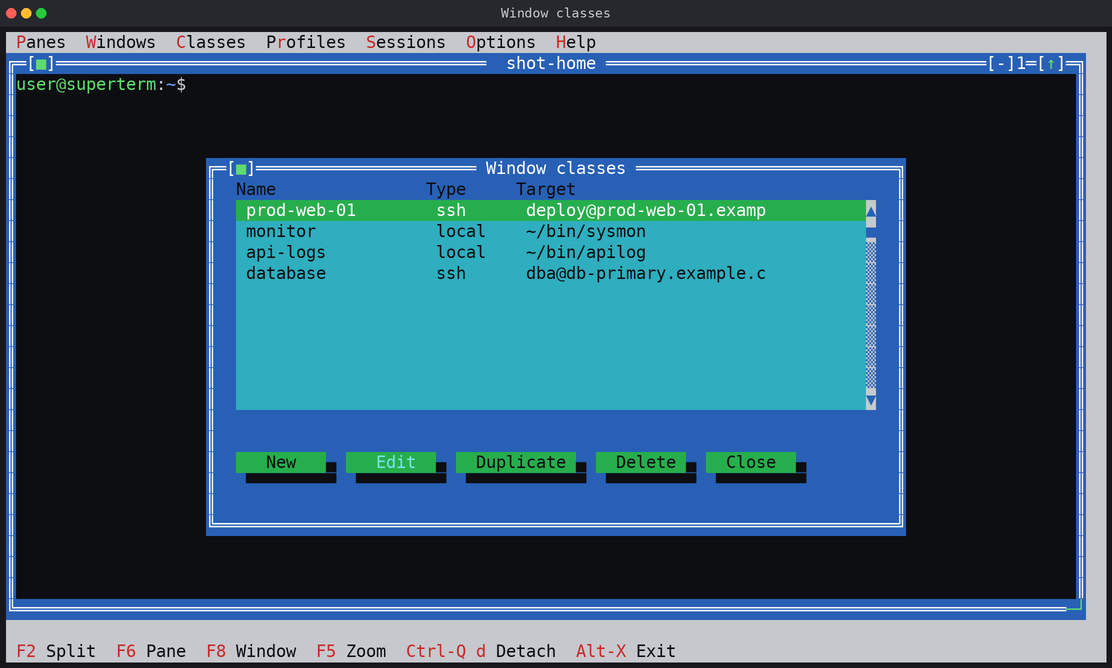
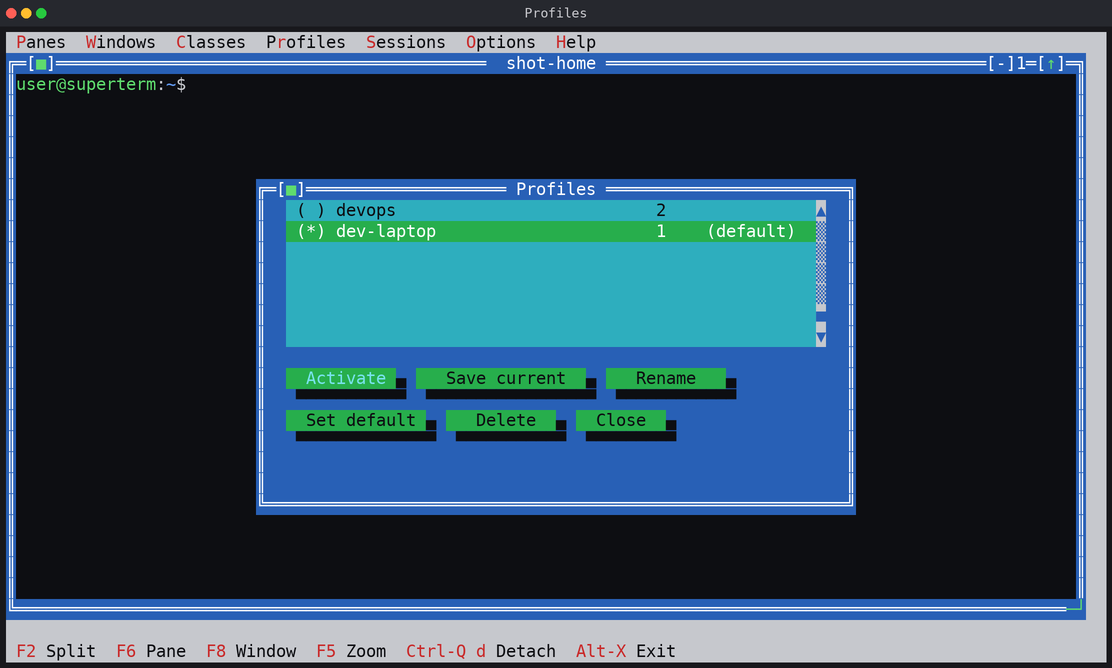
Las clases de ventana ([class.*]) son definiciones de panel reutilizables y con nombre, para comandos locales y para conexiones SSH estructuradas con claves, agentes, soporte opcional de contraseña con sshpass y comandos posteriores a la conexión. Los perfiles ([profile.*]) son espacios de trabajo con nombre cuyos paneles referencian esas clases. Todo se edita dentro de la aplicación y se guarda en un único fichero INI.
Window classes ([class.*]) are reusable named pane definitions for local commands and for structured SSH connections with keys, agents, optional sshpass password support and post-connect commands. Profiles ([profile.*]) are named workspaces whose panes reference those classes. Everything is edited in the app and stored in one INI file.
~/.superterm/sessions/.~/.superterm/sessions/.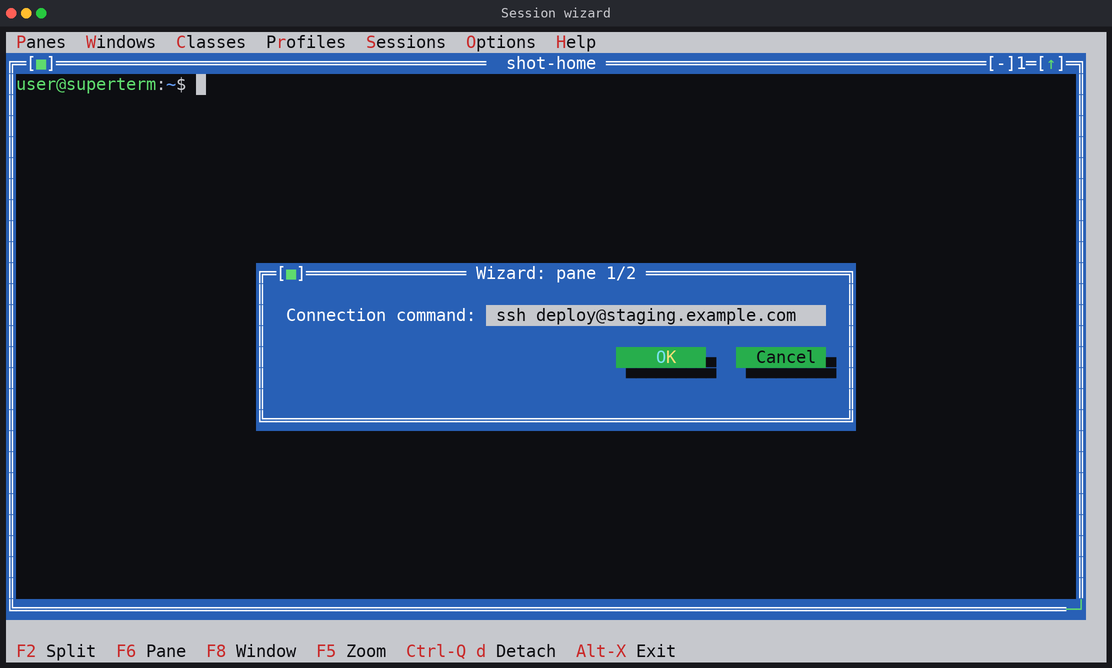
~/.superterm/session.ini~/.superterm/session.ini[t-*] y plantillas [template.*] heredadas (INI o SQLite) se siguen leyendo y migrando[t-*] terminals and [template.*] templates (INI or SQLite) are still read and migratedTodos los comandos y opciones se aceptan en inglés y en español, sin distinguir mayúsculas y sin tener en cuenta los acentos; los mensajes siguen el ajuste [ui] language (o LANG si aún no hay configuración).
Every command and option is accepted in English and in Spanish, case-insensitively and ignoring accents; messages follow the [ui] language setting (or LANG when no configuration exists yet).
| English | Español | Qué haceWhat it does |
|---|---|---|
| list | listar | Tabla de sesiones, o detalle de los paneles de unaSessions table, or pane details of one |
| send | enviar | Escribir en un panel (añade Enter; -k manda teclas con nombre)Type into a pane (appends Enter; -k sends named keys) |
| capture | capturar | Volcar la pantalla visible, las últimas N líneas o todo el scrollbackDump the visible screen, the last N lines or the whole scrollback |
| new | nueva | Abrir un panel nuevo desde fueraOpen a new pane from outside |
| close | cerrar | Cerrar un panelClose a pane |
| focus | foco | Mover el focoMove the focus |
| rename | renombrar | Renombrar una ventanaRename a window |
| resize | tamano | Fijar explícitamente el tamaño del PTY compartidoExplicitly set the size of the shared PTY |
| minimize | minimizar | Minimizar a barra de títuloMinimize to a title bar |
| restore | restaurar | Restaurar una ventana minimizadaRestore a minimized window |
| zoom | ampliar | Maximizar una ventana al escritorio (el terminal entero es Ctrl-Q f, en el cliente)Maximize a window to the desktop (the whole terminal is Ctrl-Q f, in the client) |
| organize | organizar | Re-organizar todas las ventanas (p. ej. grid / rejilla)Re-tile every window (e.g. grid / rejilla) |
| attach | — | Conectar el terminal interactivo a una sesión vivaAttach the interactive terminal to a live session |
| kill | matar | Terminar una sesión y sus programasTerminate a session and its programs |
Objetivos: SESION, SESION:PANEL (índice de base 1 o subcadena única del título), y . para la única sesión viva. Referencia completa en docs/CLI.md.
Targets: SESSION, SESSION:PANE (1-based index or a unique title substring), and . for the only live session. Full reference in docs/CLI.md.
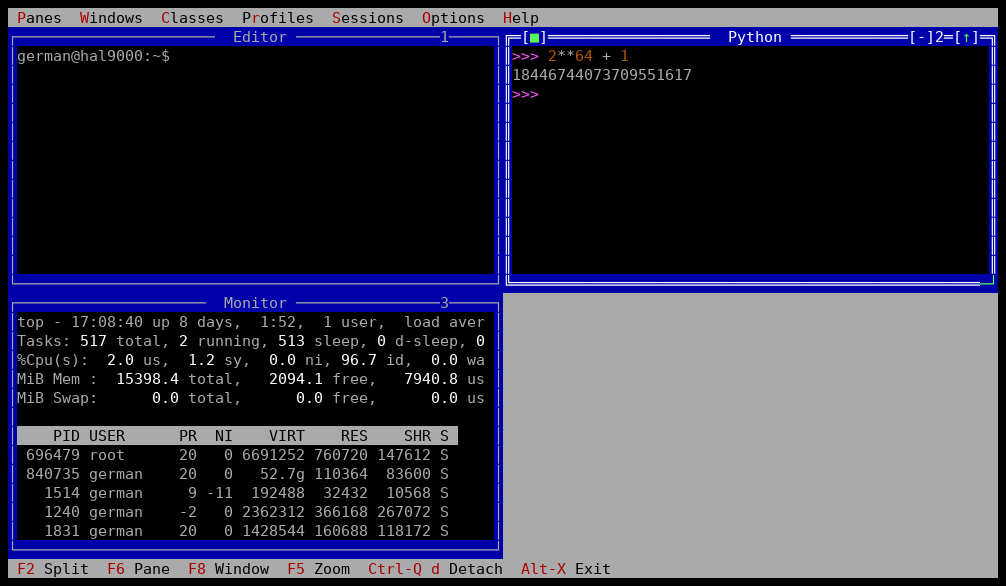
nueva, renombrados con renombrar, re-organizados con organizar rejilla — mientras el cliente conectado lo ve suceder.nueva, renamed with renombrar, re-tiled with organizar rejilla — while the attached client watches it happen.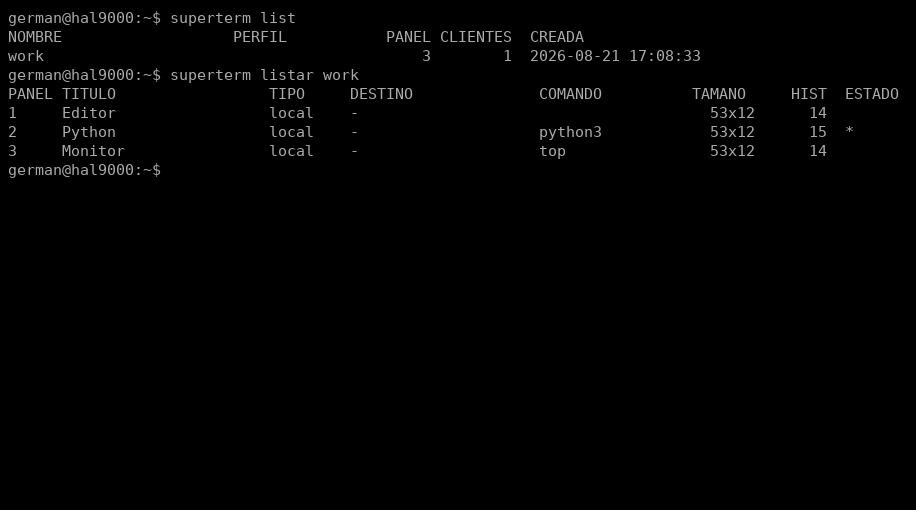
listar.listar alias.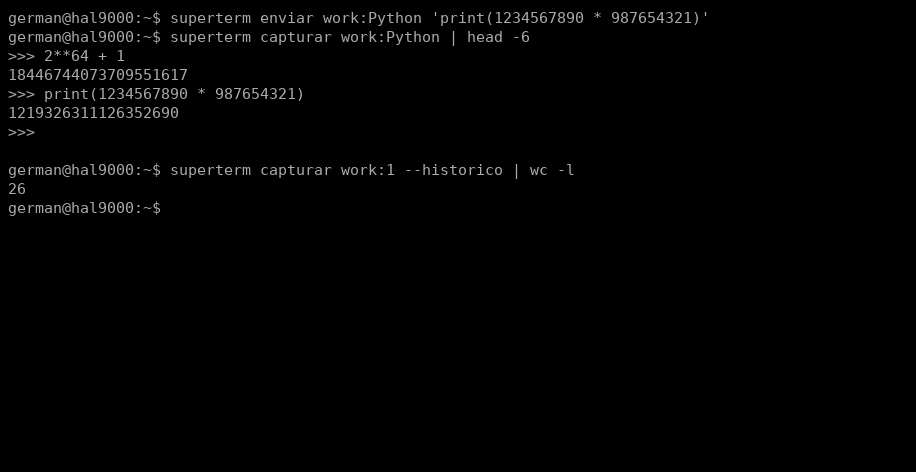
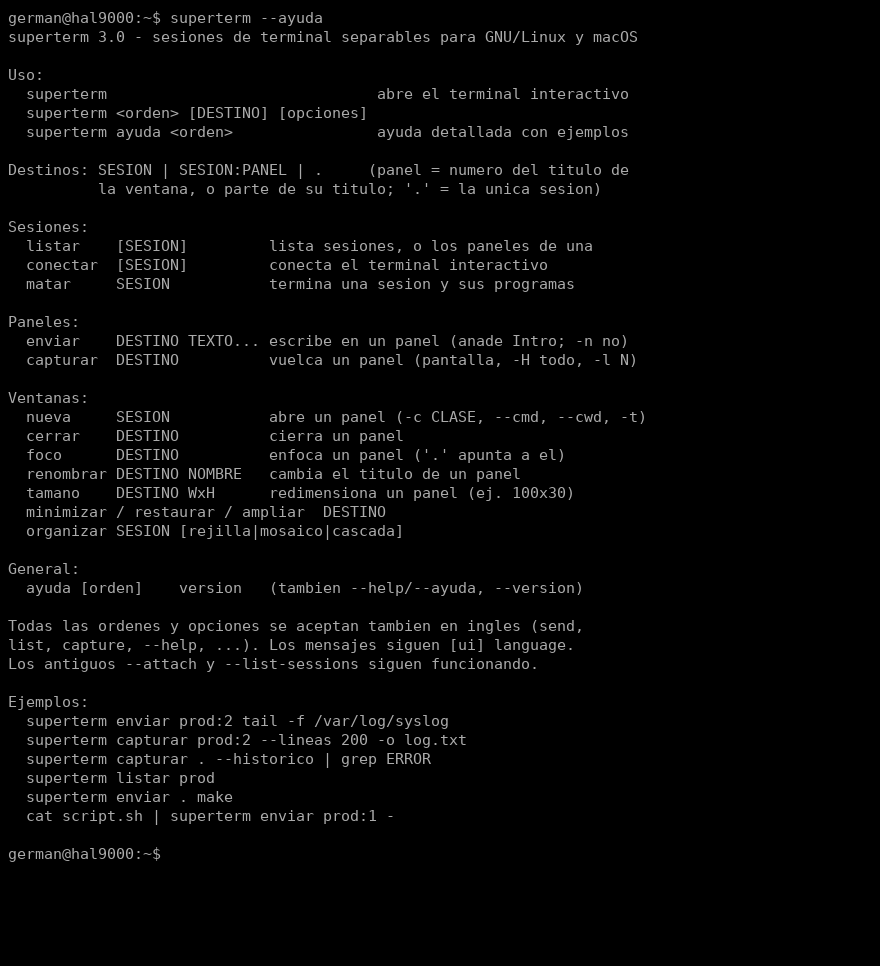
--help / --ayuda).--help / --ayuda).Hasta ocho clientes conectados a la vez a la misma sesión y al mismo escritorio canónico: paneles, geometría, foco, terminales y operaciones de ventana se comparten en vivo. Cada dispositivo usa su terminal como ventana de visión; uno pequeño recorta o rellena sin inventar otro escritorio, y un cliente lento o muerto nunca puede frenar al resto.
Up to eight clients can share the same session and the same canonical desktop: panes, geometry, focus, terminals and window operations stay live and synchronized. Each device uses its terminal as a viewport; a smaller one clips or pads without inventing another desktop, and a slow or dead client can never stall the rest.
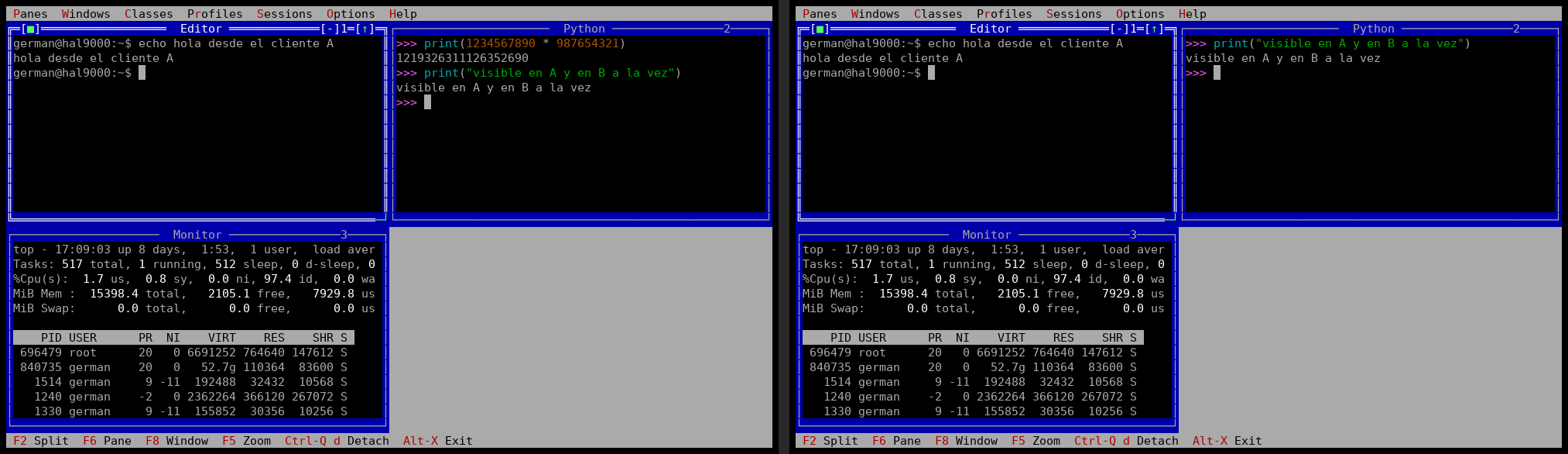
print inyectado desde una tercera shell con la CLI de control.print injected from a third shell with the control CLI.SuperTerm ya no está atado a la consola donde arrancó. Un cliente SSH estándar abre la interfaz completa, se conecta al mismo demonio de sesión que un cliente local y recupera el escritorio exactamente como quedó: paneles, procesos, geometría, foco y contenido. Si cae la red o cierras el portátil, sólo desaparece esa vista; el trabajo continúa.
SuperTerm is no longer tied to the console where it started. A standard SSH client opens the complete interface, joins the same session daemon as a local client and restores the desktop exactly as it was: panes, processes, geometry, focus and content. If the network drops or the laptop closes, only that view disappears; the work keeps running.
La 5.2.2 mantiene todo lo anterior y consolida una sola arquitectura elegida con mediciones. El protocolo de conexión sigue en la versión 16: perfiles, sesiones, clases de ventana y el servicio SSH dedicado se pueden actualizar sin romper compatibilidad.
Version 5.2.2 keeps everything above and consolidates one architecture chosen by measurement. The attach protocol remains at version 16: profiles, sessions, window classes and the dedicated SSH service can be upgraded without a compatibility break.
# administrator: create the independent, hardened listener
$ sudo superterm ssh-server setup
$ sudo superterm ssh-server check
$ sudo superterm ssh-server restart

# user: no special client, tunnel or browser required
$ ssh -p 8022 you@server
Cuatro diseños compitieron sobre los mismos contratos y pruebas intercaladas. La línea de cliente orientada a eventos y reactor único obtuvo los mejores resultados y es ahora la base oficial.
Four designs competed against the same behaviour contracts and interleaved tests. The event-driven single-reactor client measured best and is now the line everyone extends.
Entrada, sockets, PTY y salida despiertan al instante. Un reactor de terminal no bloqueante, con cola acotada de 8 MiB, conserva las transacciones ANSI y descarta sólo estados intermedios sustituibles.
Input, sockets, PTYs and output wake immediately. A nonblocking terminal reactor with an 8 MiB bounded queue preserves ANSI transactions and coalesces only replaceable intermediate frames.
La release convierte las advertencias del compilador en errores y fija una línea base permanente. El parser ASCII medido pasa de 874 ms a 195 ms en la prueba de 16 MiB, sin perder fidelidad VT.
The release makes compiler diagnostics fatal and records a permanent baseline. The measured ASCII parser drops from 874 ms to 195 ms on the 16 MiB probe while retaining VT fidelity.
Los comandos definidos por perfil conservan su shell supervisora: al interrumpirlos con Ctrl-C o Ctrl-\, el panel sigue utilizable en vez de quedar cerrado.
Profile-defined commands keep their supervising shell alive: interrupting with Ctrl-C or Ctrl-\ returns to a usable pane instead of an exited window.
El protocolo de attach permanece en v16. Cierra las sesiones vivas antes de cambiar el binario y vuelve a ejecutar ssh-server setup para refrescar el descriptor; la configuración y las claves se conservan.
The attach protocol stays at v16. Close live sessions before replacing the binary and rerun ssh-server setup to refresh the descriptor; configuration and keys are preserved.
OpenSSH aporta cifrado, autenticación Unix/PAM, claves públicas y el PTY exterior. SuperTerm entrega su escritorio entero con un ForceCommand restringido.
OpenSSH supplies encryption, Unix/PAM authentication, public keys and the outer PTY. SuperTerm delivers its entire desktop through a restricted ForceCommand.
Servicio, puerto, proceso, clave de host y configuración propios. No edita /etc/ssh/sshd_config ni reinicia el acceso SSH administrativo existente.
Its own service, port, process, host key and configuration. It never edits /etc/ssh/sshd_config or restarts the host's administrative SSH access.
Las shells, editores, monitores y conexiones remotas siguen dentro del demonio. Reconectar devuelve el escritorio vivo, no una aproximación guardada.
Shells, editors, monitors and remote connections stay inside the daemon. Reconnecting returns the live desktop, not a saved approximation.
Hasta ocho clientes ven y controlan el mismo árbol de paneles. Las operaciones concurrentes se ordenan, los clientes lentos se aíslan y los cambios visuales llegan atómicamente.
Up to eight clients see and control the same pane tree. Concurrent operations are ordered, slow clients are isolated and visual changes arrive atomically.
Crea sesiones con nombre y perfiles vacíos desde los menús. Los catálogos se guardan con bloqueo, control de generación y reemplazo atómico para no perder cambios concurrentes.
Create named sessions and empty profiles from the menus. Catalogues use locking, generation checks and atomic replacement so concurrent edits are never silently lost.
superterm --help es un índice navegable y --help all emite una referencia determinista: arranque, sesiones, paneles, SSH y administración, en inglés y español.
superterm --help is a navigable index and --help all emits a deterministic reference: startup, sessions, panes, SSH and administration, in English and Spanish.
El nuevo hacker alienígena fue creado para SuperTerm, tiene transparencia real, se funde con cualquier color del escritorio y se distribuye bajo GPLv3.
The new alien hacker was created for SuperTerm, carries real transparency, dissolves into any desktop colour and ships under GPLv3.
El listener está diseñado sólo para la interfaz interactiva: rechaza comandos remotos, SFTP/SCP, subsistemas, forwarding, X11 y sesiones sin PTY. La guía completa está en SSH_QUICKSTART.md y la frontera de seguridad en SSH_SERVER.md. The listener is intentionally limited to the interactive interface: remote commands, SFTP/SCP, subsystems, forwarding, X11 and sessions without a PTY are rejected. See SSH_QUICKSTART.md and the complete security boundary in SSH_SERVER.md.
Una grabación completa y sin maqueta: la consola, masterp y s-masterp intercambian mensajes mediante Tiza y Pizarra dentro de un escritorio SuperTerm. Es el espacio de trabajo de texto convertido en centro de operaciones para equipos de agentes.
A complete, non-mock recording: the console, masterp and s-masterp exchange messages through Tiza and Pizarra inside a SuperTerm desktop. It is the text workspace turned into an operations centre for agent teams.
Conectarse con un terminal más pequeño — o cambiarle el tamaño — ya no toca el PTY compartido ni reajusta a todos los demás. La política por defecto, resize_policy=session, mantiene una pantalla canónica en el demonio y le da a cada interfaz su ventana de visión privada sobre ella, con seguimiento del cursor y coordenadas de ratón y de copia traducidas. La geometría de las ventanas y el foco son locales de cada cliente; los títulos compartidos y los comandos de ventana de la CLI se siguen propagando. resize_policy=smallest conserva el comportamiento anterior del mínimo común.
Attaching with a smaller terminal — or resizing one — no longer touches the shared PTY or reflows everybody else. The default policy, resize_policy=session, keeps one canonical screen in the daemon and gives each interface its own private viewport onto it, with cursor following and translated mouse and copy coordinates. Window geometry and focus are client-local; shared titles and the CLI's window commands still propagate. resize_policy=smallest retains the former common-minimum behaviour.
Con vistas independientes, el tamaño real del PTY deja de ser algo que negocie el último que llega. Paneles > Ajustar PTY a esta ventana lo iguala a la ventana actual cuando eso es justo lo que quieres, y superterm tamano DESTINO AxB lo fija desde fuera.
With independent viewports, the real PTY size stops being something the last arrival negotiates. Panes > Set PTY to this window fits it to the current window when that is exactly what you want, and superterm resize TARGET WxH sets it from outside.
Mientras haya otros conectados, salir de forma interactiva ya sólo te saca a ti: Alt-X sigue guardando y Alt-Q sigue saltándose el guardado, pero ninguno de los dos puede cerrar la interfaz de otra persona. El último cliente que se va cierra la sesión. El matar explícito de la CLI sigue afectando a la sesión entera.
While others are attached, an interactive exit now takes out only you: Alt-X still saves and Alt-Q still skips saving, but neither can end somebody else's interface. The last client to leave closes the session. The CLI's explicit kill is still session-wide.
El demonio es ahora un único reactor poll(2): el listener, las conexiones a medio hacer, los clientes conectados y los PTY de los paneles, todos no bloqueantes y servidos desde un mismo bucle con presupuesto por vuelta. Una conexión que manda medio encabezado caduca en un segundo; un cliente que acumula medio megabyte sin avanzar durante diez se queda fuera y los demás siguen; y los descriptores por encima del viejo techo de 1023 de select() son simplemente descriptores.
The daemon is one poll(2) reactor now: the listener, half-made connections, attached clients and the panes' PTYs are all nonblocking and served from a single loop with a per-tick budget. A connection that sends half a header expires in a second; a client that piles up half a megabyte and makes no progress for ten is cut loose while the rest carry on; and descriptors above select()'s old ceiling of 1023 are simply descriptors.
[session] multithread=1 — el valor por defecto — deja el demonio exactamente como estaba: un hilo, un reactor. Con auto, o con un tope de hilos, los paneles ocupados corren en su propio fpPoll, creado al aparecer el panel y retirado al cerrarse, mientras el reactor de sockets sigue siendo el único dueño de cada cliente y de cada estructura de sesión. El tope efectivo nunca supera las CPU disponibles, SUPERTERM_MULTITHREAD manda sobre el fichero para un arranque, y un demonio en marcha conserva el modo con el que nació.
[session] multithread=1 — the default — leaves the daemon exactly as it was: one thread, one reactor. With auto, or a thread cap, busy panes run on their own fpPoll worker, created when the pane appears and removed when it closes, while the socket reactor remains the sole owner of every client and session structure. The effective cap never exceeds the CPUs available, SUPERTERM_MULTITHREAD overrides the file for one launch, and a running daemon keeps the mode it started with.
El modo directo mantiene su seguridad geométrica cuando los clientes conectados usan terminales de tamaños distintos, y el repintado del cursor de FreeVision ya no se cuela en el modo crudo.
Passthrough stays geometrically safe when the attached clients use terminals of different sizes, and the FreeVision cursor repaint no longer leaks into raw mode.
Cada push compila y pasa la suite completa en GNU/Linux x86_64, macOS Apple Silicon y macOS Intel. La compilación de macOS vuelve a estar sin un solo aviso del compilador.
Every push builds and runs the full suite on GNU/Linux x86_64, macOS Apple Silicon and macOS Intel. The macOS build is back to zero compiler hints.
El menú Portapapeles guarda en memoria los diez últimos elementos y deja elegir cuál se pega. Ctrl-Q [ entra en modo copia en el panel enfocado, Ctrl-Q ] pega el más reciente y Ctrl-Q h abre el historial. Lo que se pega desde el terminal anfitrión llega de una pieza gracias al modo bracketed paste, y lo que copia un panel — o lo que escribe con OSC 52 — llega al portapapeles del anfitrión, que es lo que hace que funcione cuando el panel es una conexión SSH. Un panel que pide leer el portapapeles no obtiene respuesta.
The Clipboard menu keeps the ten most recent items in memory and lets you choose which one to paste. Ctrl-Q [ enters copy mode in the focused pane, Ctrl-Q ] pastes the newest one, and Ctrl-Q h opens the history. A paste from the host terminal arrives in one piece through bracketed-paste mode, and what a pane copies — or writes with OSC 52 — reaches the host clipboard, which is what makes it work when the pane is an SSH connection. A pane asking to read the clipboard is not answered.
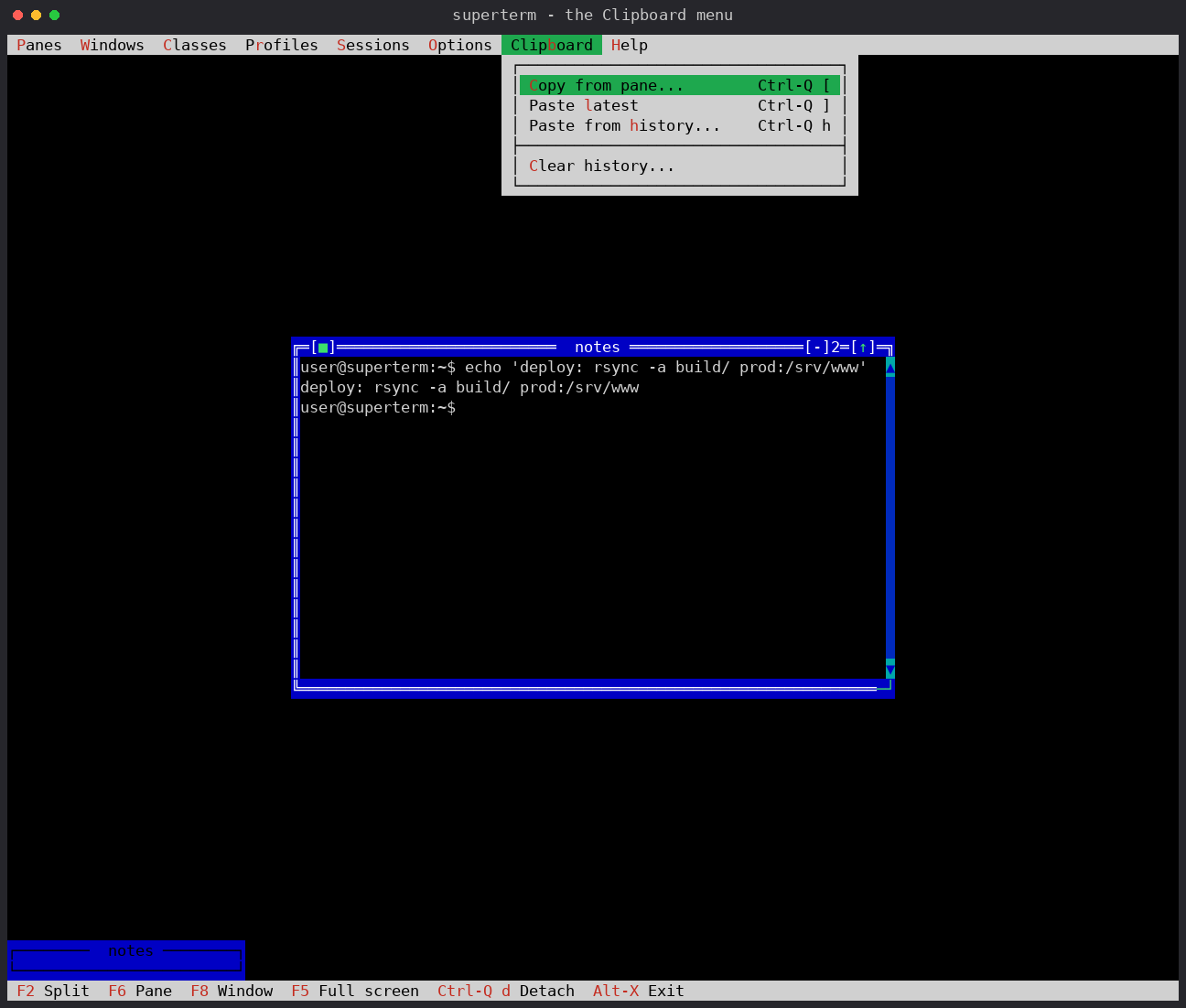
Portapapeles: Copiar del panel..., Pegar ultimo, Pegar del historial... y Borrar historial..., cada uno con su atajo.Clipboard menu: Copy from pane..., Paste latest, Paste from history... and Clear history..., each with its shortcut.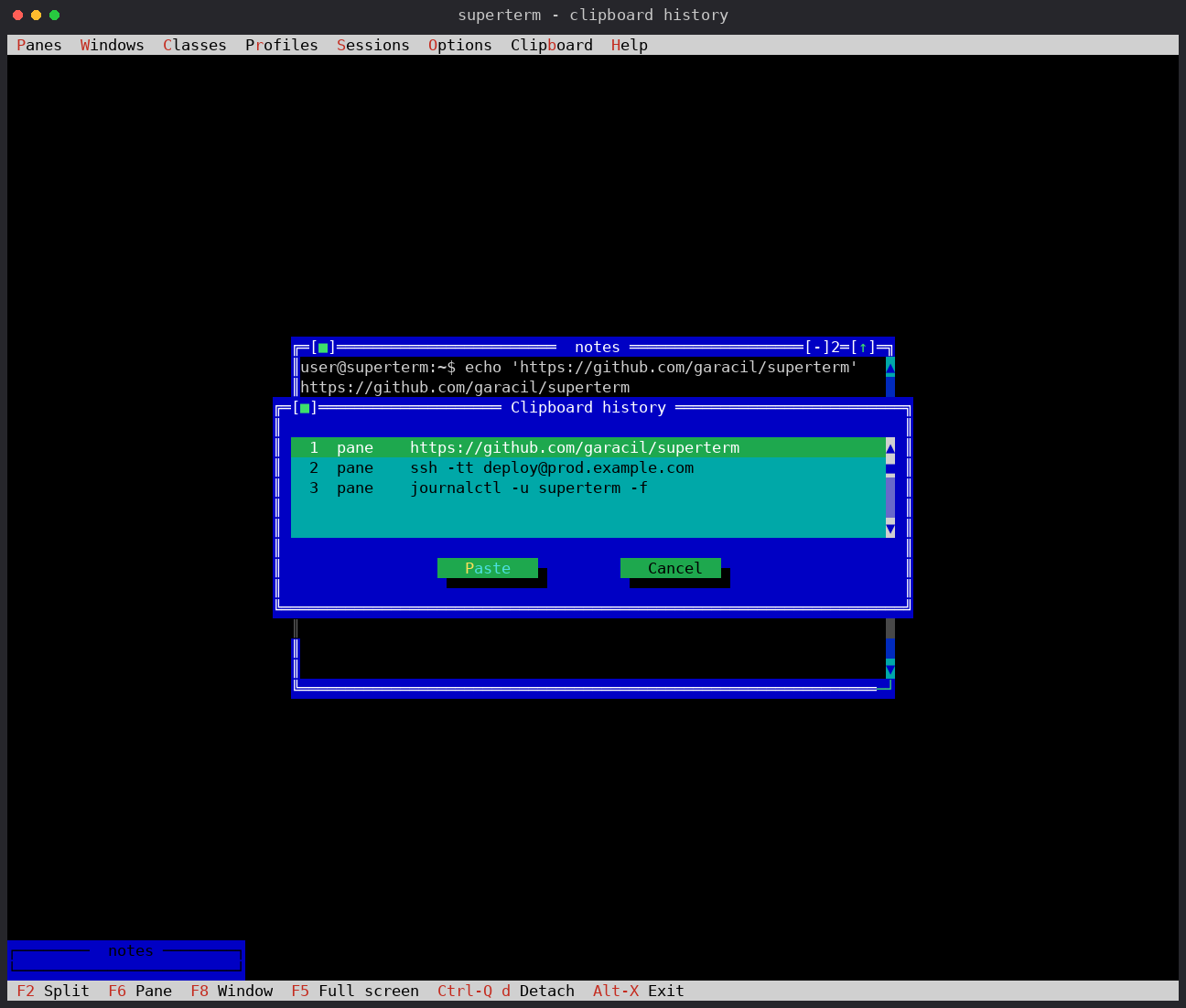
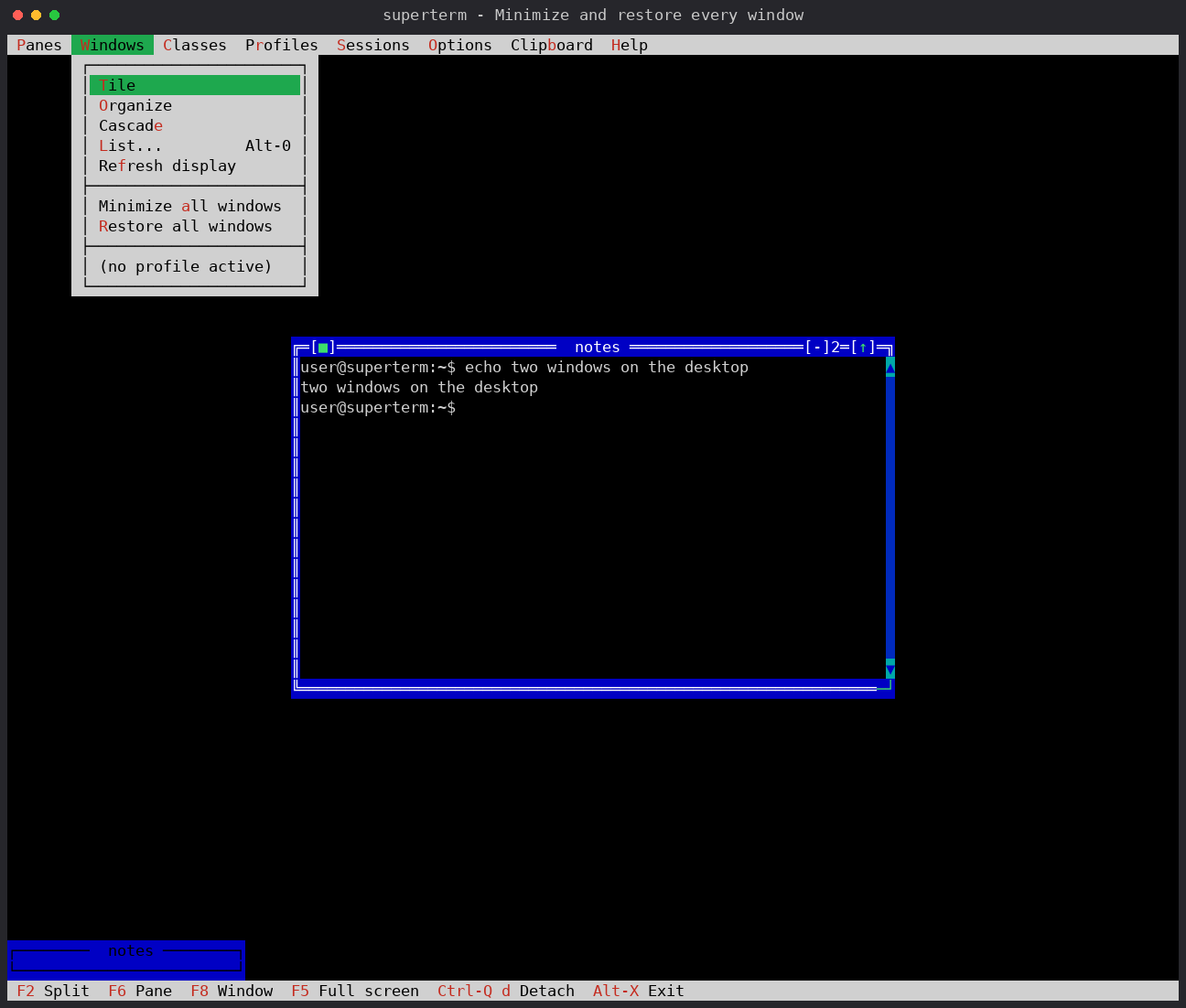
Ventanas > Minimizar todas las ventanas y Restaurar todas las ventanas actúan sobre el espacio de trabajo entero; las entradas de una sola ventana siguen en Paneles.Windows > Minimize all windows and Restore all windows act on the whole workspace at once; the per-window entries remain in Panes.
La 3.5.0 trajo además docs/DEBUGGING.md: qué encienden SUPERTERM_DEBUG y SUPERTERM_DEBUG_FULL, cómo se lee una línea de traza, qué lleva el informe de caída — motivo, rol, pid, tiempo en marcha, traza inversa con fichero y línea — y cómo dirigir una reproducción desde un script con test/stlib.py, el mismo arnés sobre el que corre la suite. Todo, en el CHANGELOG.
3.5.0 also brought docs/DEBUGGING.md: what SUPERTERM_DEBUG and SUPERTERM_DEBUG_FULL turn on, how to read a line of trace, what the crash report carries — reason, role, pid, uptime, a backtrace with file and line — and how to drive a reproduction from a script with test/stlib.py, the same harness the suite runs on. All of it in the CHANGELOG.
Son dos operaciones distintas: maximizar — el icono [↑] de la ventana, o Paneles > Maximizar/restaurar — llena el escritorio y conserva el marco, el menú y la línea de estado; Ctrl-Q f entrega el terminal completo al panel con sus bytes PTY en crudo para TUIs de fidelidad total. El mismo acorde restaura el escritorio. El F5 físico vuelve a pertenecer a la aplicación del panel.
These are two separate operations: maximise — the window's [↑] icon, or Panes > Maximize/restore — fills the desktop while keeping the frame, menu and status line; Ctrl-Q f hands the whole terminal to the pane with raw PTY bytes for full-fidelity TUIs. The same chord restores the desktop. Physical F5 belongs to the pane application again.
La barra de menú, la línea de estado y el cuadro se quedan donde estaban y el escritorio simplemente queda vacío; Clases, o Paneles > Dividir horizontal, vuelven a abrir un panel — una sesión sin paneles es un estado legítimo, local o en un demonio. Salir es algo que se pide: Paneles > Salir de superterm, Alt-X.
The menu bar, the status line and the picture stay exactly where they were and the desktop is simply empty; Classes, or Panes > Split, open a pane again — a session holding no panes is a legitimate state, local or in a daemon. Leaving is something you ask for: Panes > Exit superterm, Alt-X.
Conectado a una sesión, abrir un panel — desde una clase, desde el menú o desde la CLI — llevaba el foco a una ventana ya abierta, y cerrarla se llevaba por delante al cliente. El cliente refleja los paneles del demonio en cuatro vectores paralelos y sólo tres se limpiaban al insertar: el cuarto guardaba la ventana del vecino, duplicada. El camino local siempre los limpió los cuatro; por eso hacía falta un demonio para verlo. test/remote_newpane_test.py lo reproduce.
Attached to a session, creating a pane — from a class, from the menu, from the CLI — sent the focus to a window that was already open, and closing that window took the client down with it. The client mirrors the daemon's panes in four parallel arrays and inserting one cleared only three of them: the fourth still held the neighbour's window, now in the array twice. The local path had always cleared all four, which is why it took a daemon to see it. test/remote_newpane_test.py reproduces it.
Entrar en modo directo apagaba en el terminal el seguimiento de todo movimiento del ratón sin anotar que lo había hecho, de modo que después los dos podían no estar de acuerdo sobre su estado. La marca dice ahora lo que es verdad.
Entering passthrough turned any-motion mouse reporting off at the terminal without recording that it had, so the two could disagree about it afterwards. The flag now says what is true.
Una sesión desconectada, sin nada vivo dentro y sin nadie conectado, se sigue cerrando sola pasado su plazo de gracia, así que no queda nada olvidado por ahí. Todo, en el CHANGELOG. A detached session with nothing alive in it and nobody attached still closes itself after the usual grace period, so nothing is left lying around. All of it in the CHANGELOG.
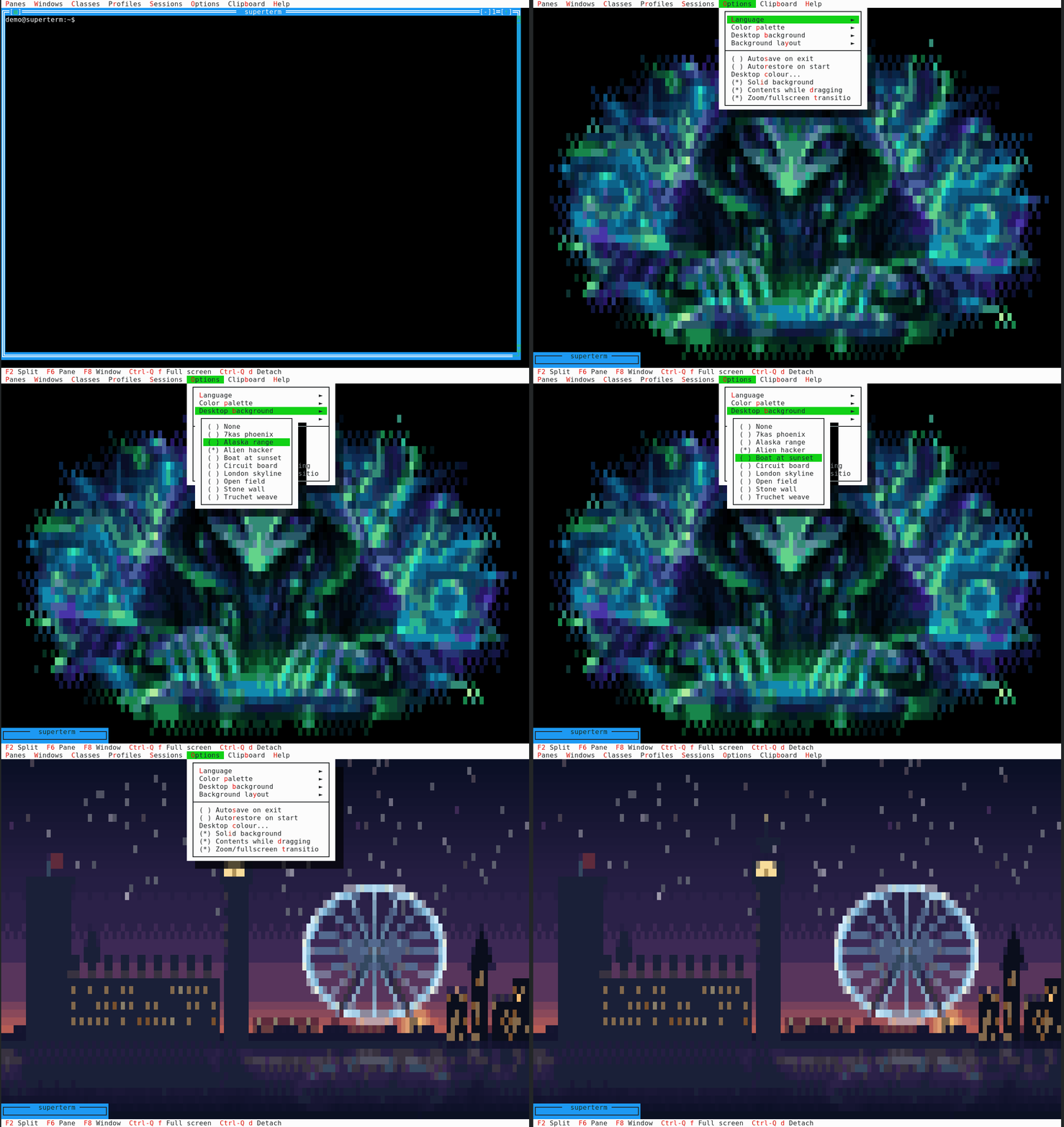
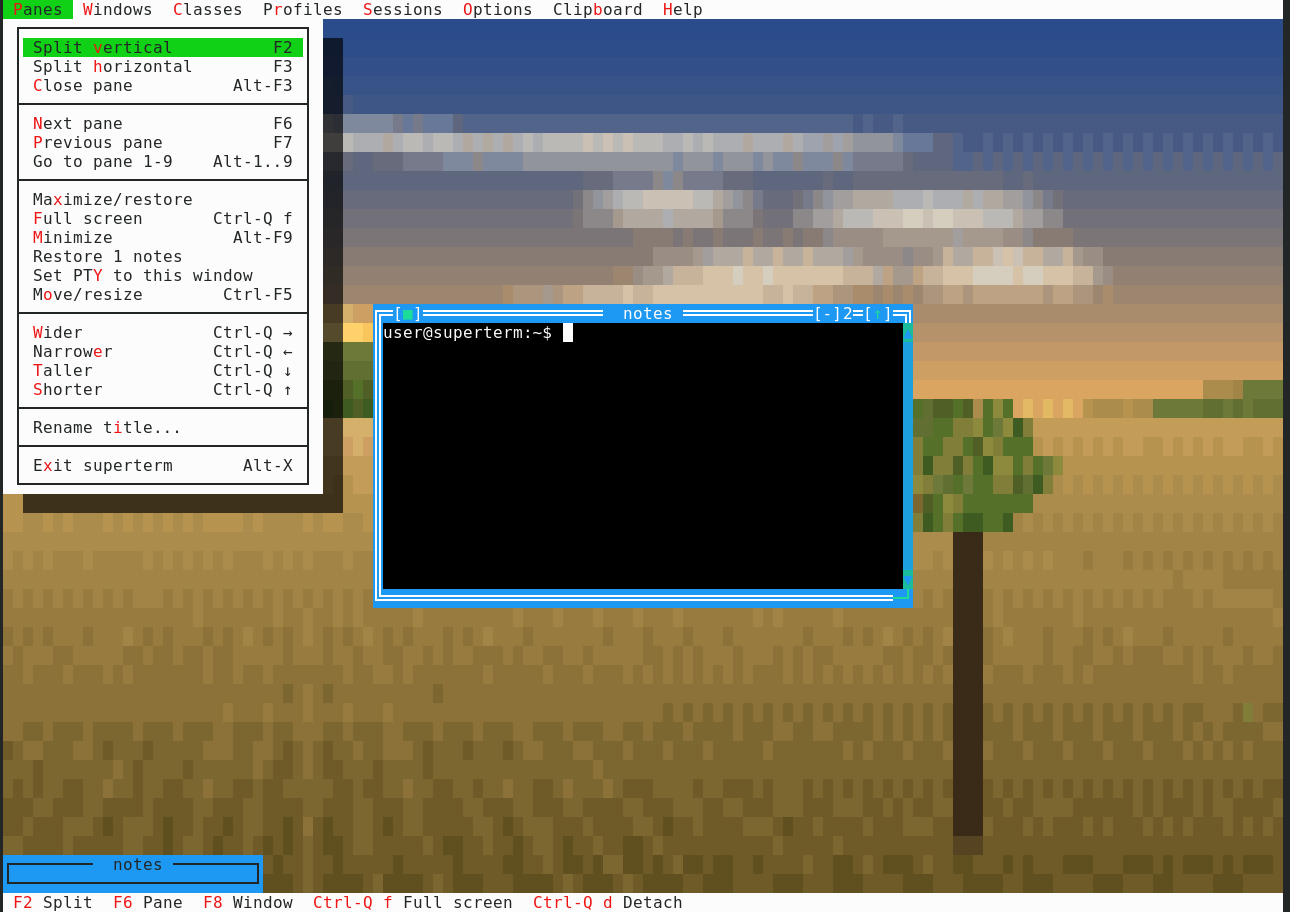
Detrás de las ventanas puede haber un cuadro, en color RGB real y no en la rejilla de 16 colores. Los cuadros son ficheros de texto plano que se leen en tiempo de ejecución: deja el tuyo en ~/.superterm/backgrounds/ y aparece en el menú sin recompilar. Vienen nueve.
There can be a picture behind the windows, in real RGB colour rather than the 16-colour grid. Pictures are plain text files read at run time: drop your own into ~/.superterm/backgrounds/ and it appears in the menu without rebuilding. Nine ship.
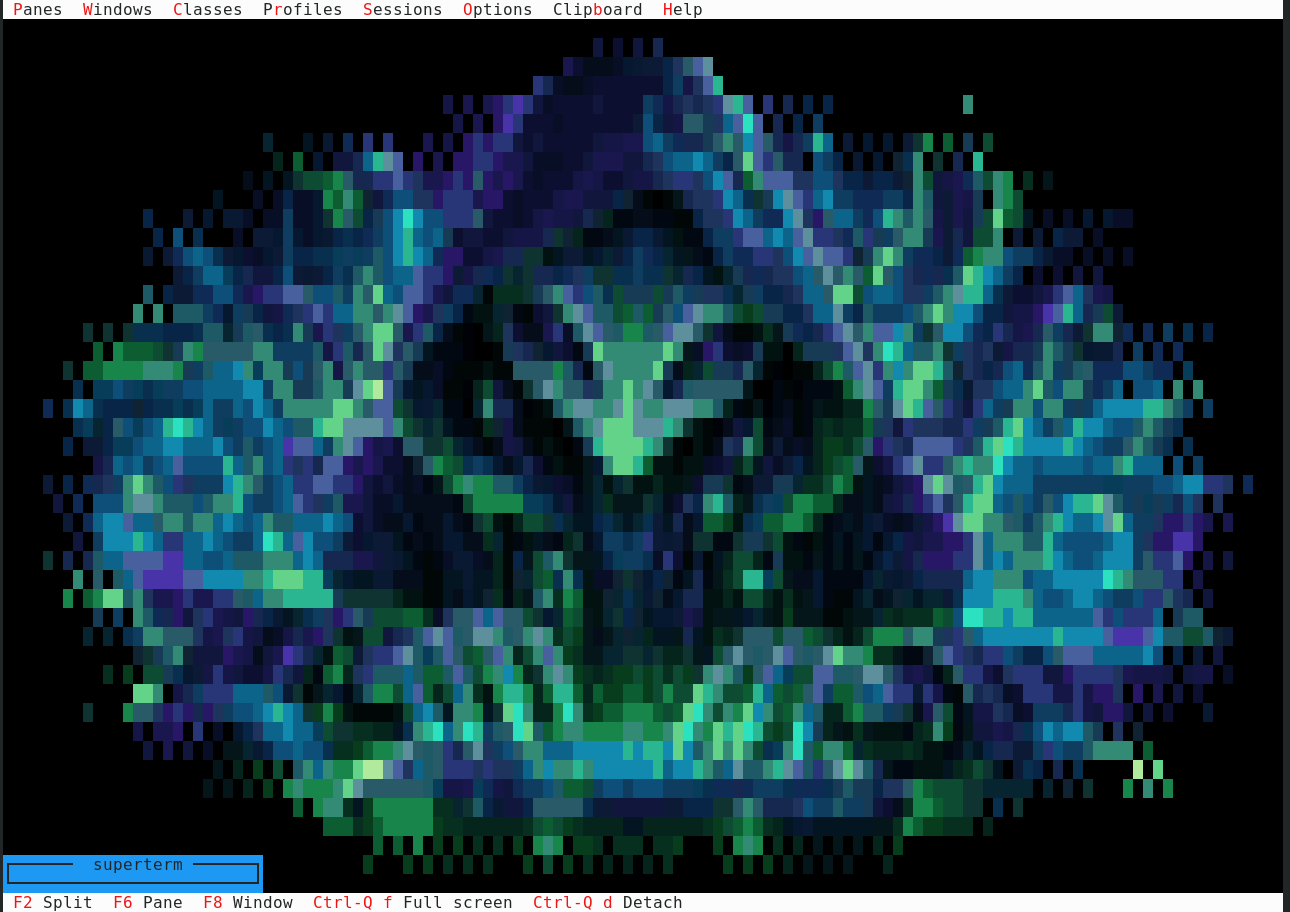
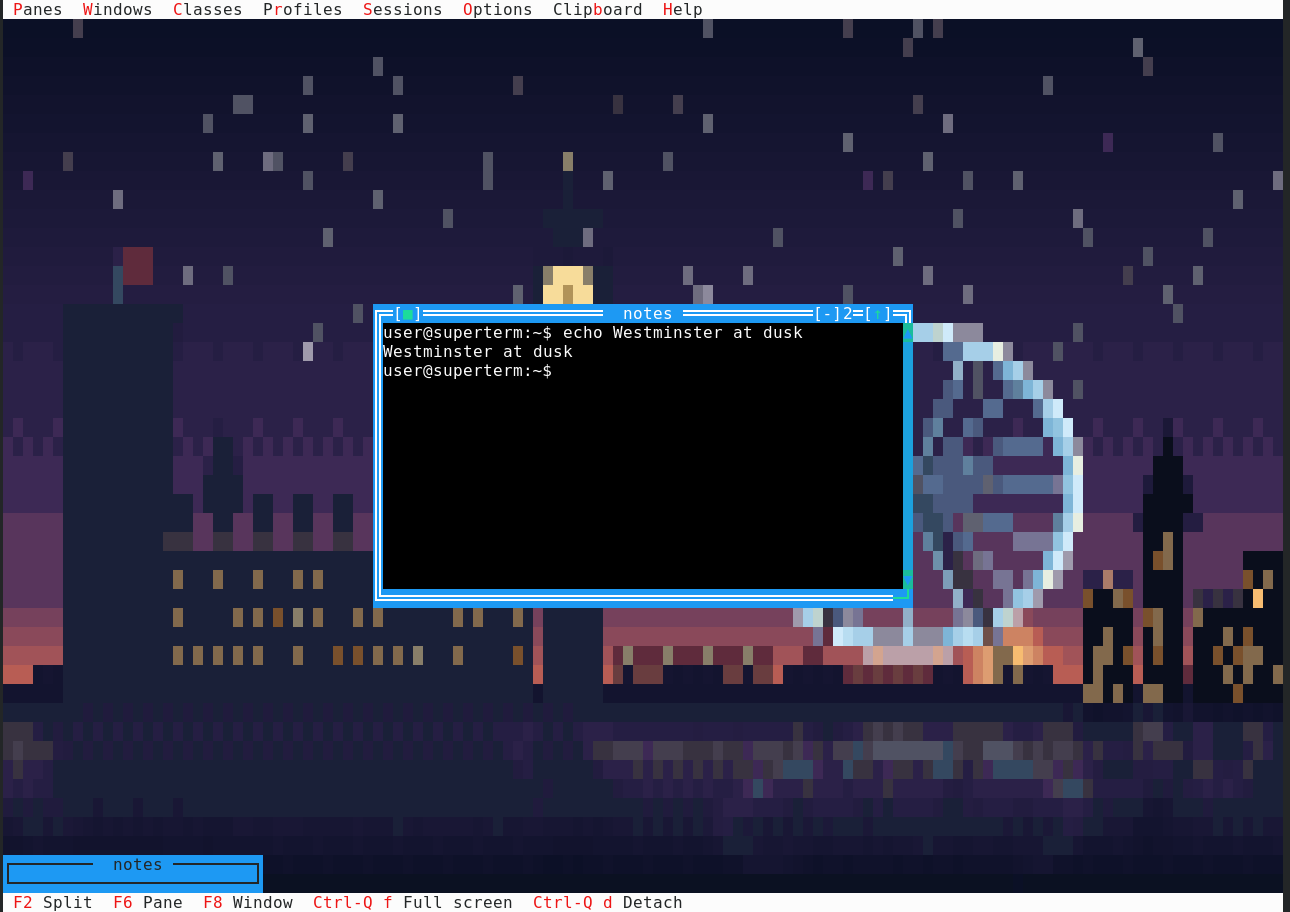
Ahora están dibujados para la pantalla en la que viven: a 1024×768 con la celda clásica de 8×16 el terminal son 128×48 caracteres y el escritorio 128×46, así que ése es su tamaño — antes eran 74×22 y acababan estirados o perdidos en una esquina. Y desde la 3.4.3 los pinta el terminal, no la fuente: una celda llena sale como un espacio sobre un fondo de color, no como un glifo de bloque de ese color. Deberían verse igual y no lo hacen — el bloque lo dibuja la fuente del terminal, y una fuente cuyo U+2588 no llena del todo su celda deja pelos entre una celda y la siguiente, que es lo que hacía que un cuadro se viera borroso. Un color de fondo lo pinta el terminal, exacto, haga lo que haga la fuente. La rejilla de FreeVision sigue llevando el bloque completo: ésa es la palabra que dice que la celda todavía es del cuadro, y tiene que ser una que no escriba nada más en la pantalla.
They are now drawn for the screen they live on: at 1024×768 with the classic 8×16 cell the terminal is 128×48 characters and the desktop 128×46, so that is their size — they used to be 74×22 and ended up either stretched or stranded in a corner. And since 3.4.3 the terminal paints them, not the font: a filled cell goes out as a space on a coloured background, never as a block glyph in that colour. They should look the same and do not — the block comes from the terminal's font, and a font whose U+2588 does not quite fill its cell leaves hairlines between one cell and the next, which is what made a picture read as blurred. A background colour is painted by the terminal itself, exactly, whatever the font is doing. The FreeVision grid still carries the full block: that is the word which says a cell is still the picture's, and it has to be one nothing else on the screen writes.

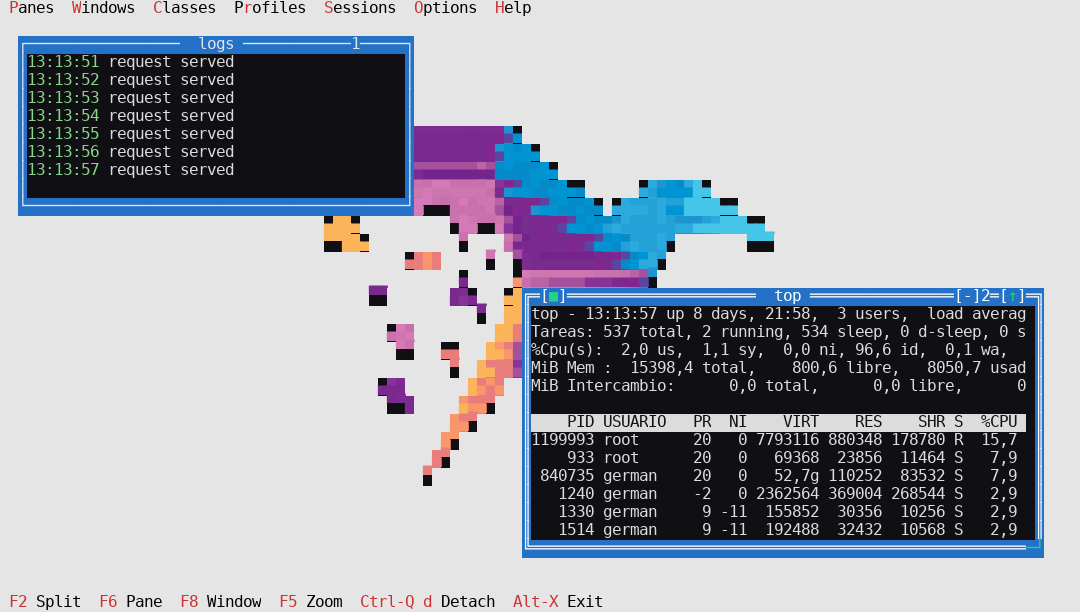
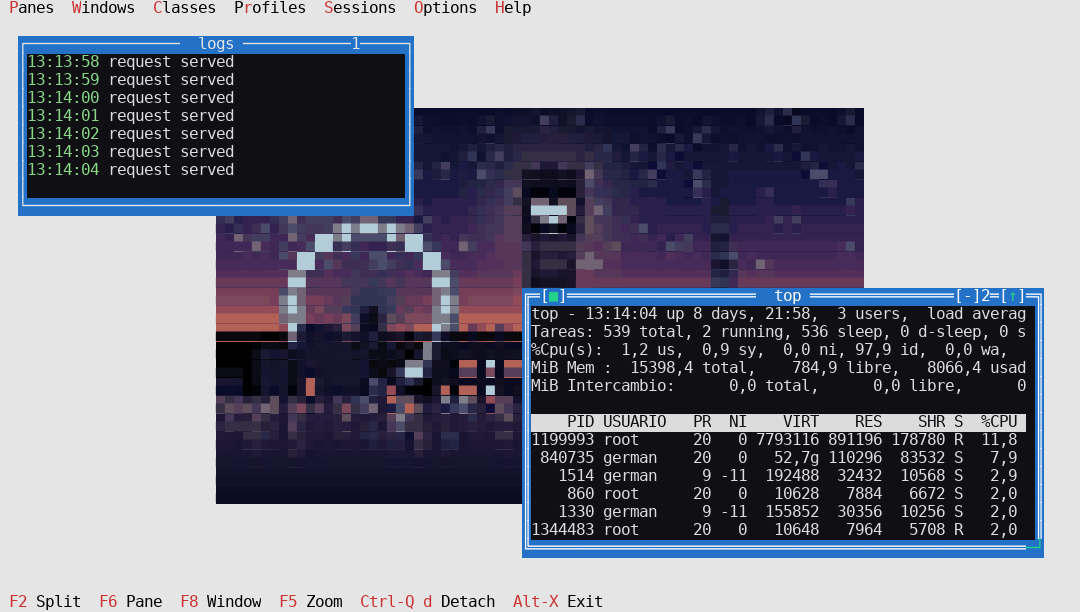
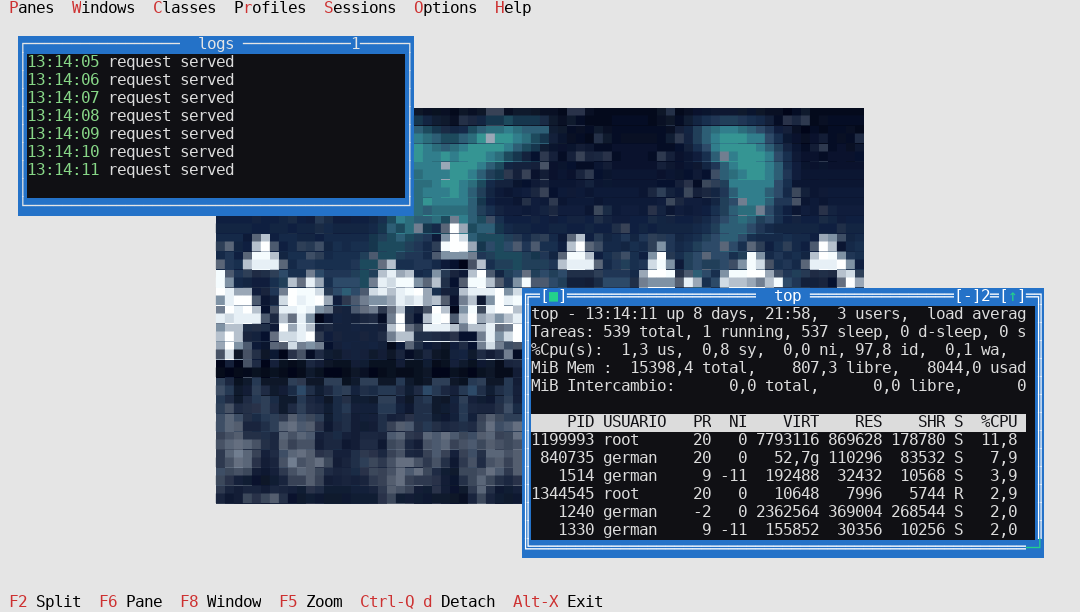
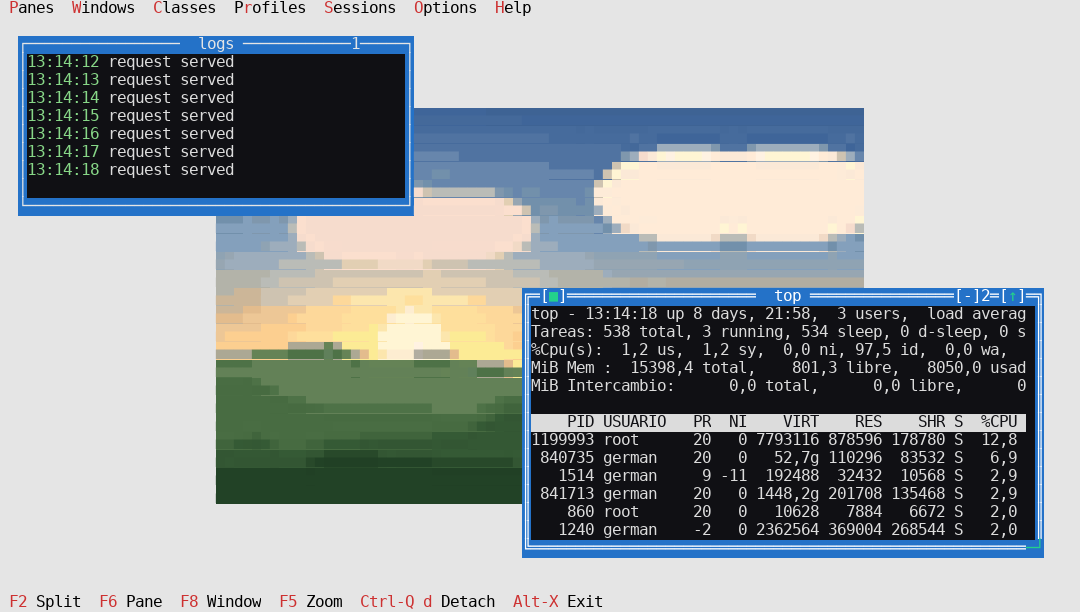
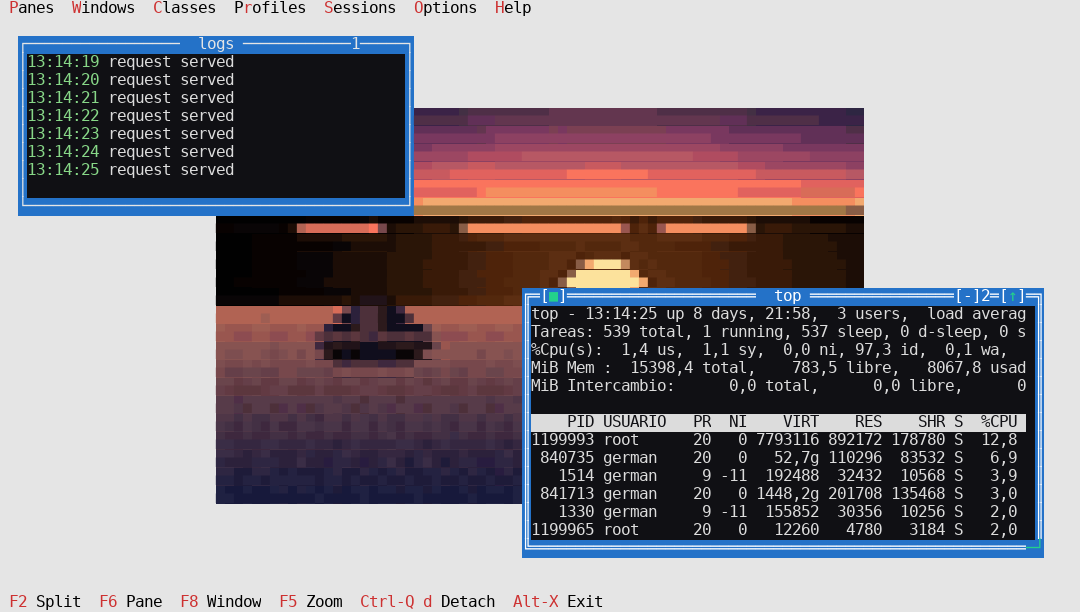
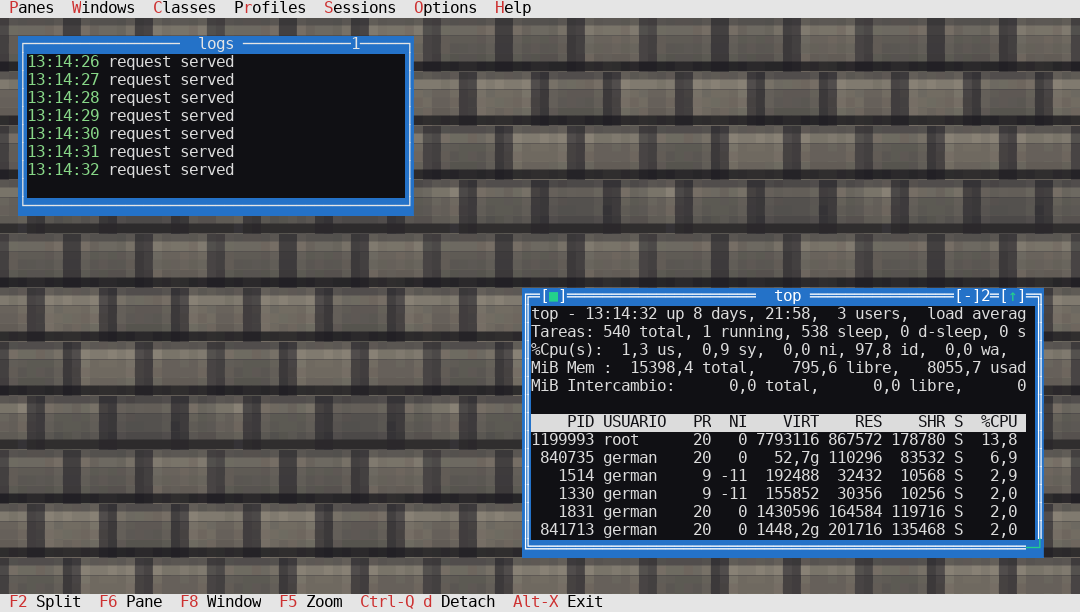
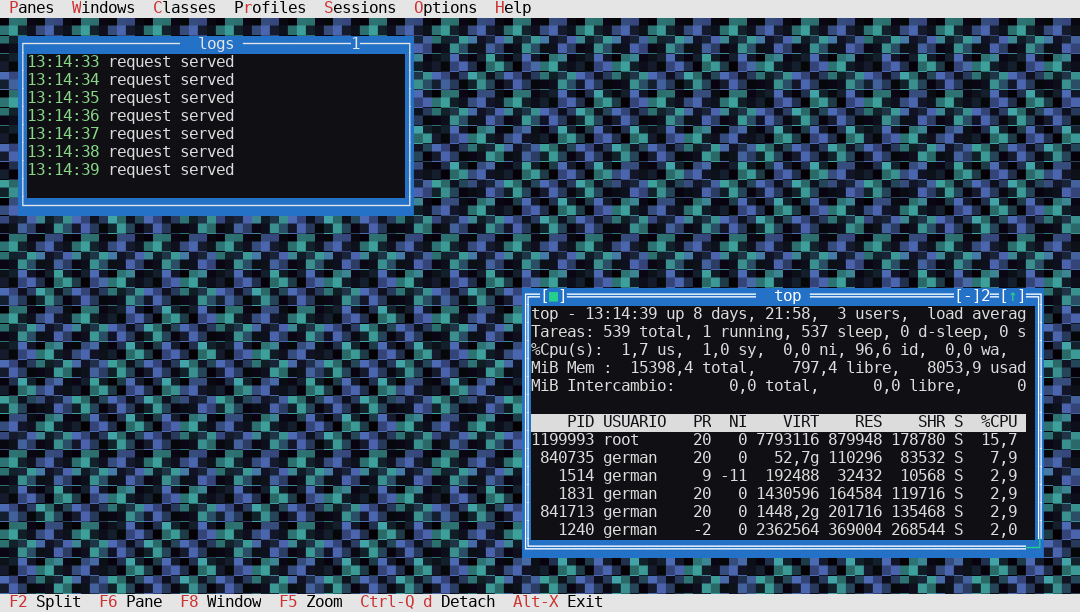
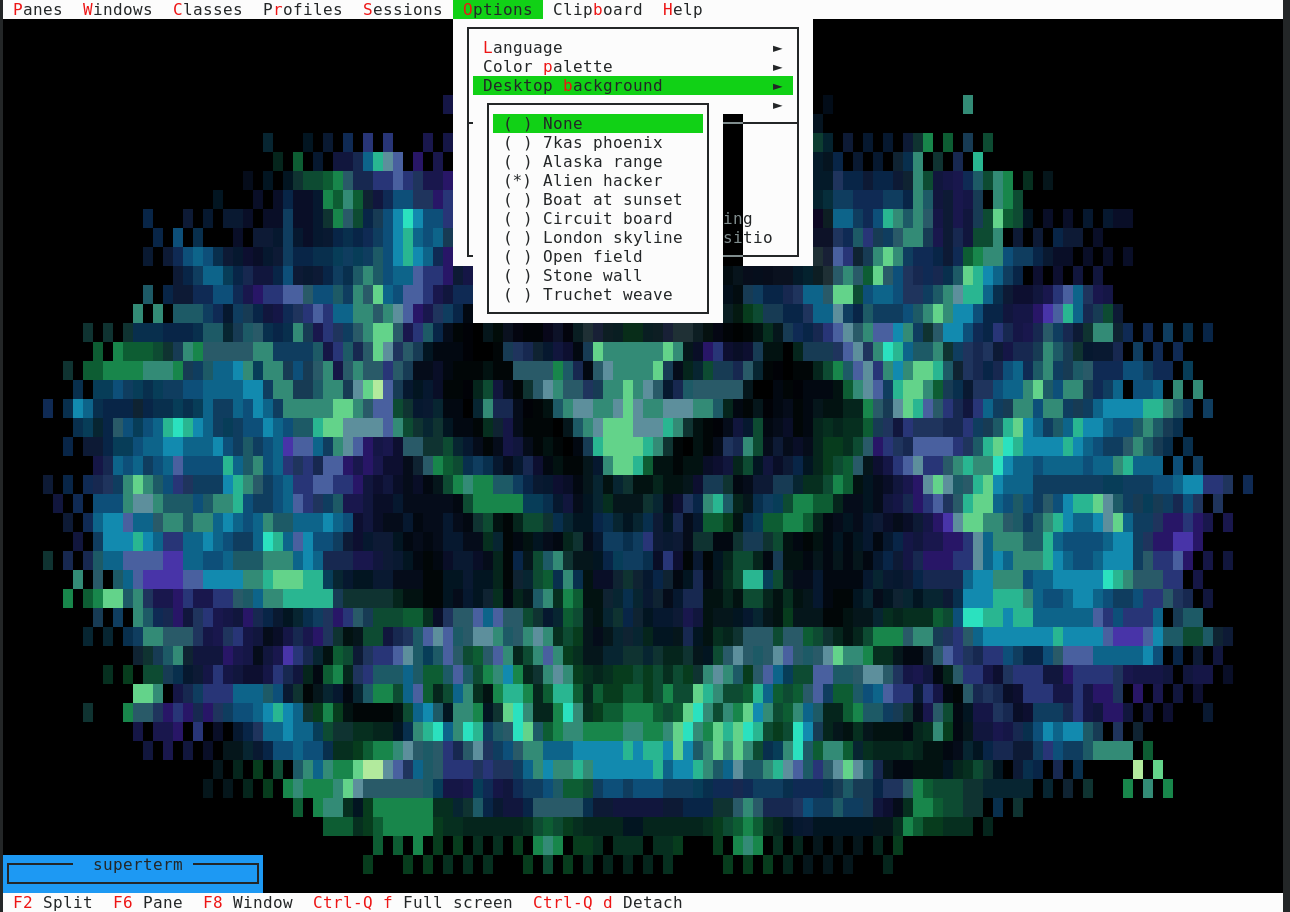
Opciones > Fondo del escritorio lista todos los cuadros que encuentra en disco, y el escritorio sigue a la elección mientras la haces.
Options > Desktop background lists every picture found on disk, and the desktop follows the choice as you make it.
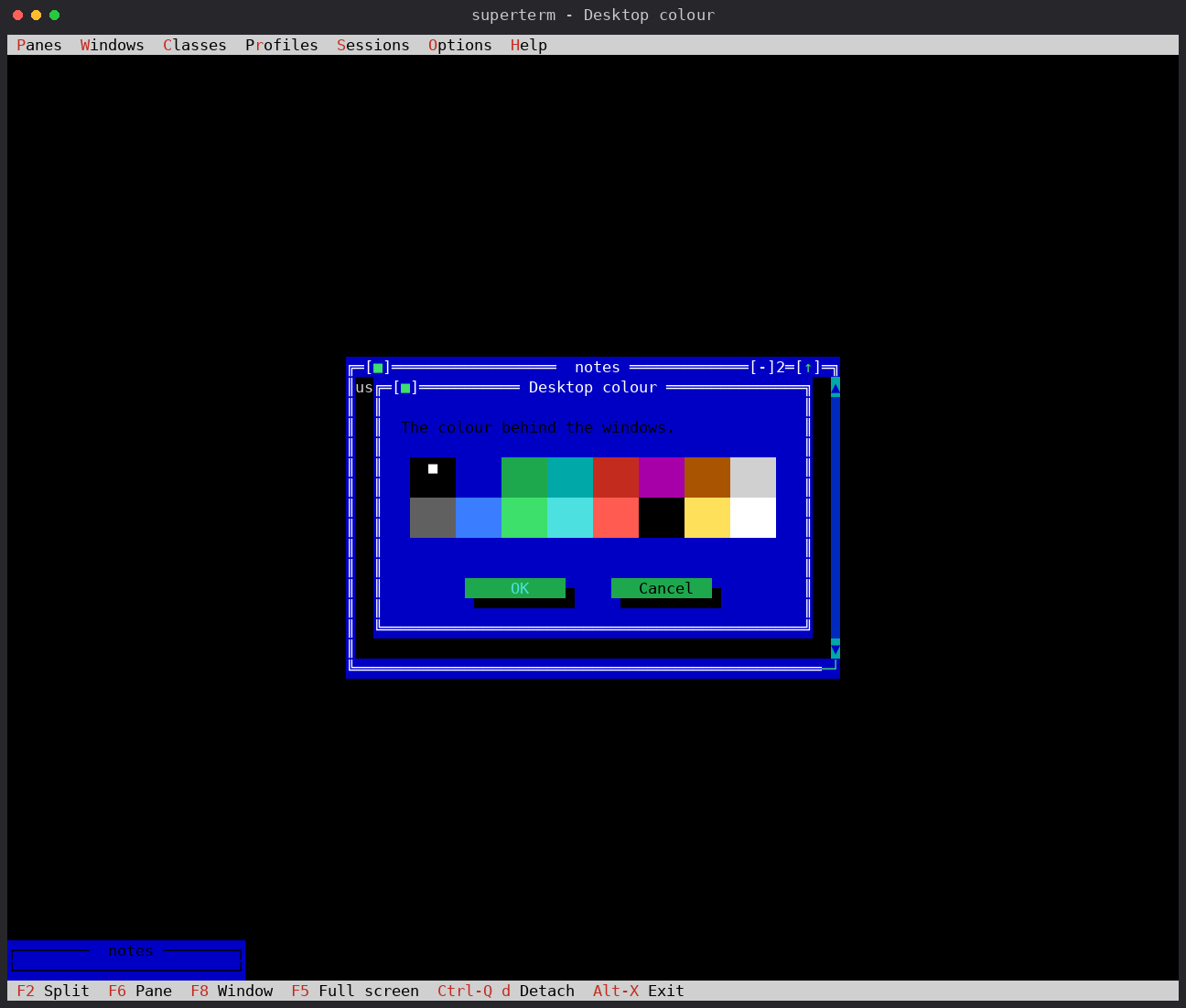
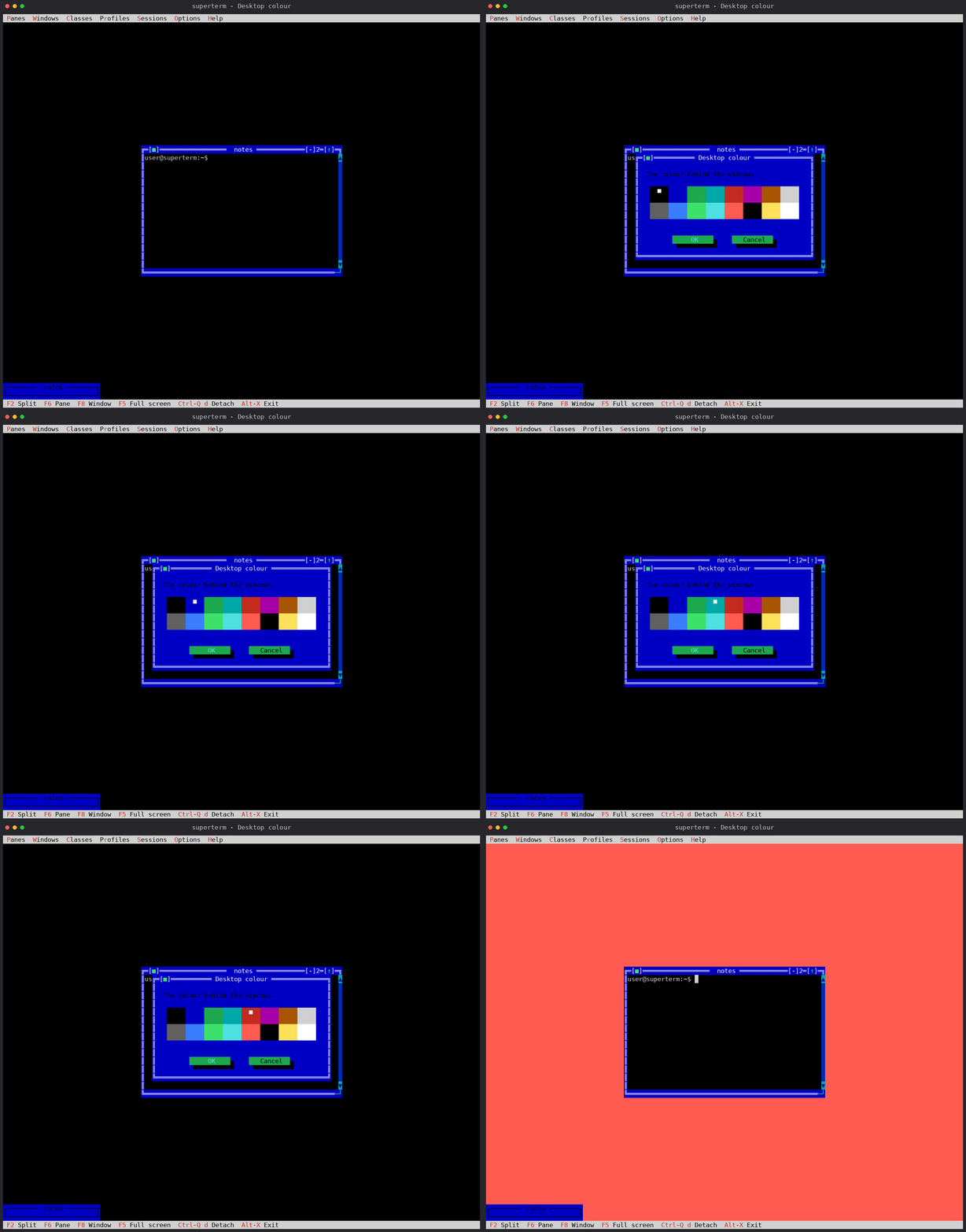
~/.superterm/backgrounds/.~/.superterm/backgrounds/.El escritorio se rellenaba con el atributo 0 — negro, siempre. Opciones > Color del escritorio... abre ahora un selector con los dieciséis colores del modo texto como muestras, con el ratón o con las flechas. El negro sigue siendo el valor por defecto, y el color rellena tanto el escritorio como las celdas vacías de un cuadro.
The desktop was filled with attribute 0 — black, always. Options > Desktop colour... now opens a picker with the sixteen text-mode colours as swatches, reachable with the mouse or the arrows. Black stays the default, and the colour fills the desktop and the empty cells of a picture alike.
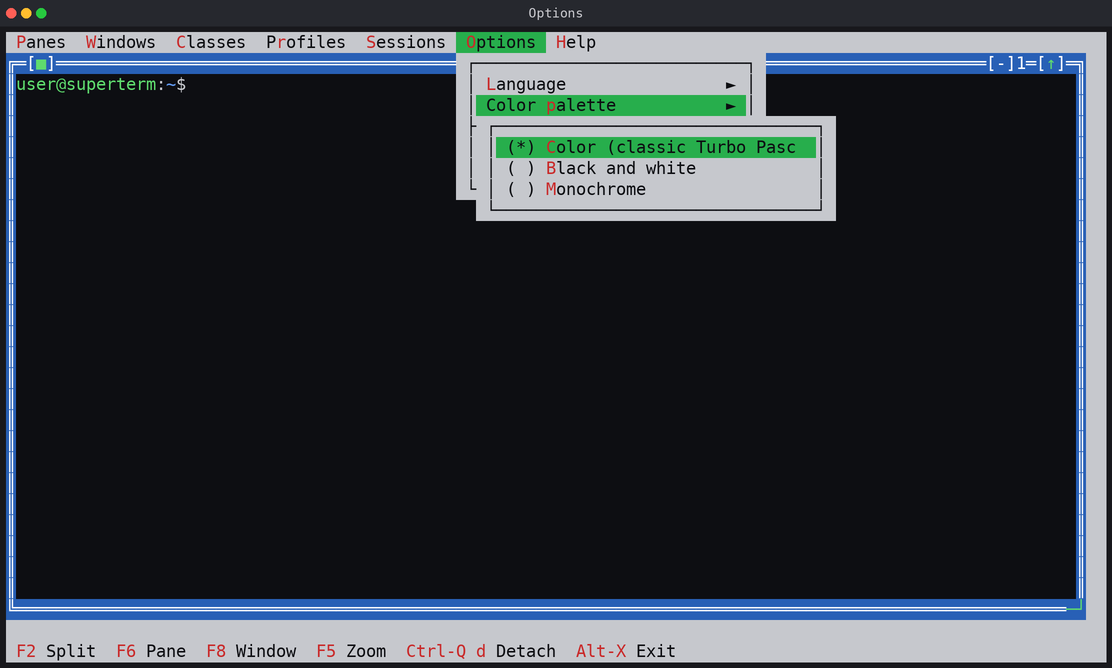
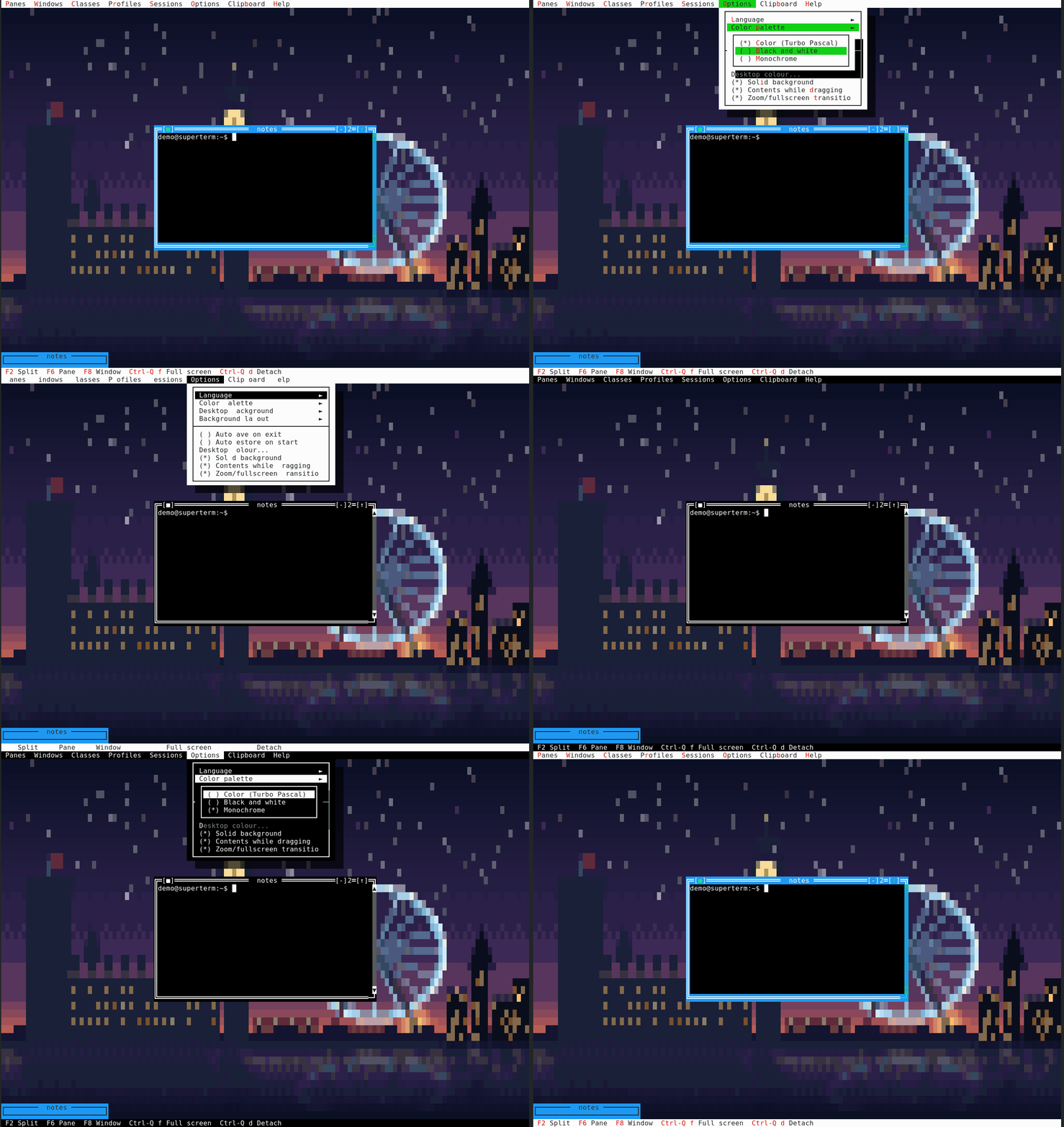
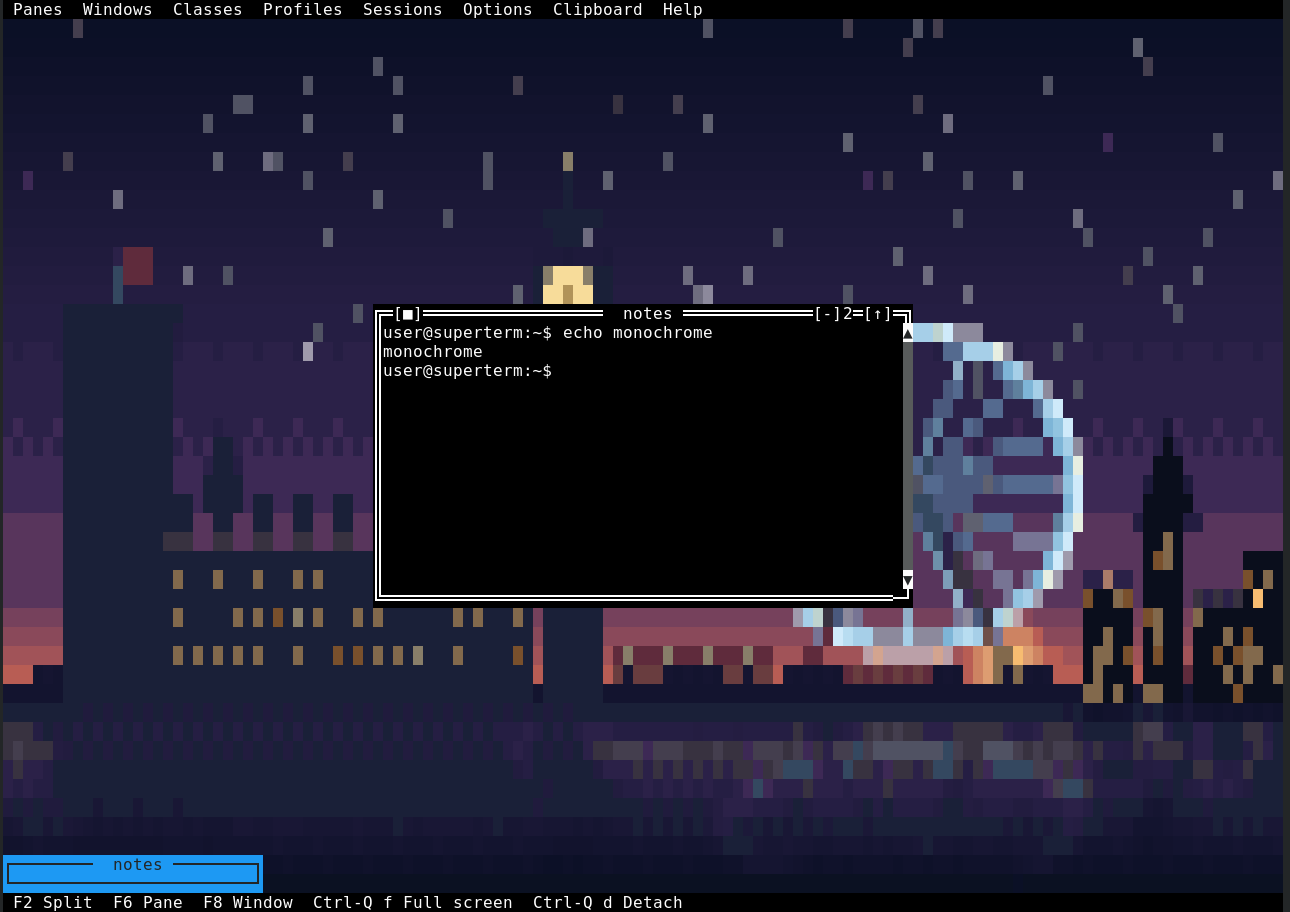
Color, blanco y negro y monocromo, desde Opciones > Paleta de colores. Un cuadro conserva sus colores en las tres — monocromo incluido: lo que se ve entre las ventanas es el cuadro que elegiste, y quitarlo no es para lo que sirve una paleta.
Colour, black and white, and monochrome, from Options > Color palette. A picture keeps its own colours in all three — monochrome included: what shows between the windows is the picture you chose, and taking it away is not what a palette is for.
FreeVision proyecta una sombra conservando el carácter de debajo y cambiándole el atributo. Eso dejaba caer la celda a su equivalente CP437: la sombra de un menú sobre un cuadro salía como los propios bloques del cuadro en gris oscuro. Ahora la celda se reconoce, se conserva y se oscurece — sobre un cuadro y sobre la salida truecolor de un panel por igual.
FreeVision casts a shadow by keeping the character underneath and changing its attribute. That dropped the cell to its CP437 fallback: the shadow of a menu over a picture came out as the picture's own block characters in dark grey. The cell is now recognised, kept, and darkened — over a picture and over a pane's own truecolor output alike.
El suelo lo pintamos nosotros. Una celda cuyo fondo era el negro de la paleta salía como «color 0», que un terminal con tema pinta como lo que él llame negro, y una celda de panel con el fondo por defecto salía sin fondo — un agujero a través de la aplicación en un terminal transparente. Ahora todos los fondos son explícitos; sólo se fuerza el negro, así que un terminal con tema conserva su azul y su cian, y el color del texto no se toca nunca. Opciones > Fondo solido lo desactiva para quien quiera esa transparencia. Disposiciones: centrado, mosaico, estirado o ajustado.
The ground is ours to paint. A cell whose background was the palette's black went out as “colour 0”, which a themed terminal paints as whatever it calls black, and a pane cell whose background was the terminal default went out with no background at all — a hole straight through the application on a transparent terminal. Every background is explicit now; only black is forced, so a themed terminal keeps its own blue and cyan, and the text colour is never touched. Options > Solid background turns it off for anyone who wants that transparency. Layouts: centred, tiled, stretched or fitted.
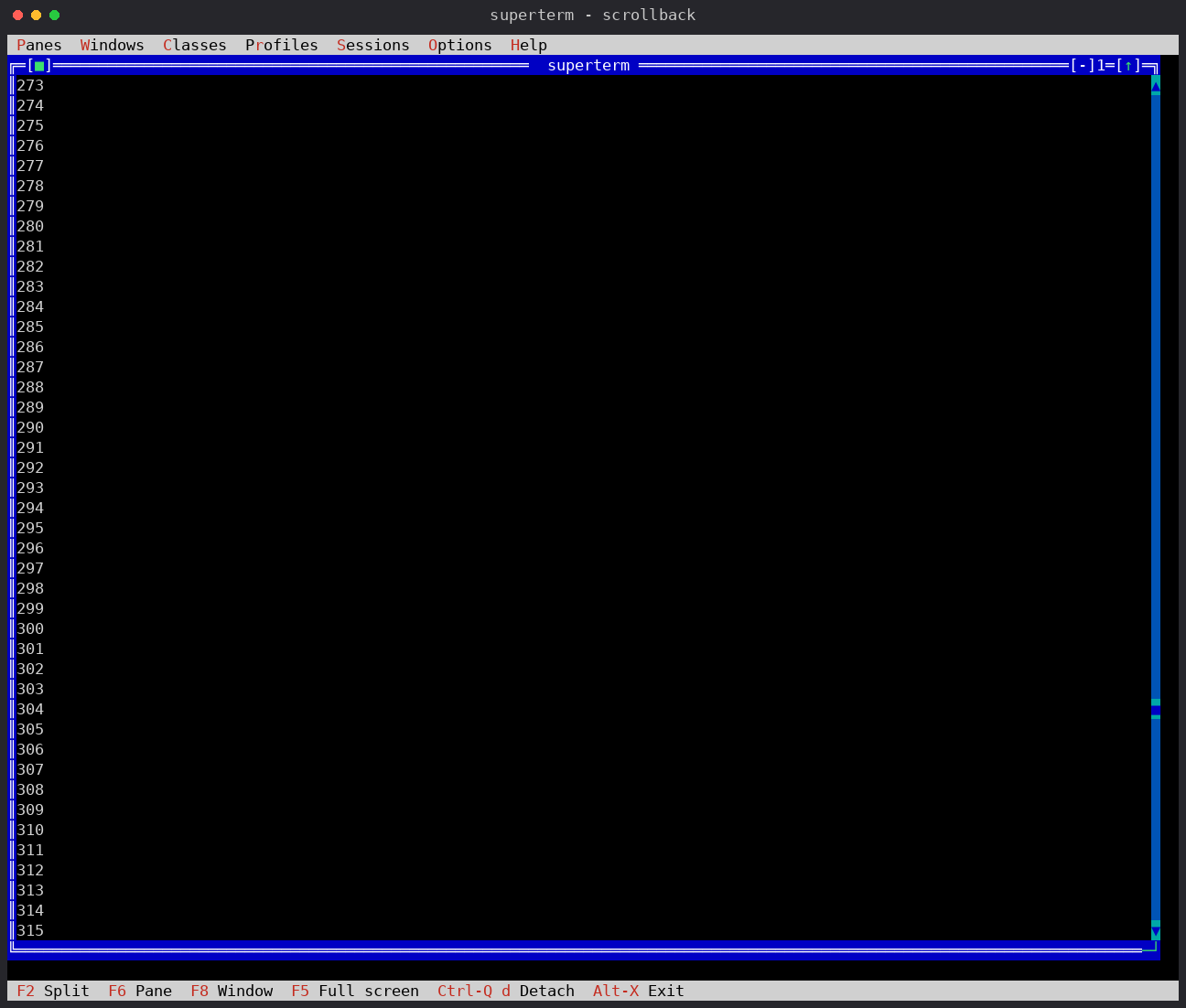
El motor de scrollback estaba completo y no había forma de llegar a él. Ahora cada ventana lleva una barra de desplazamiento en la columna derecha de su marco, que no le cuesta al panel ni una columna ni un redimensionado. La rueda del ratón mueve tres líneas por muesca sin robar el foco; sobre la pantalla alternativa — less, man, vim — manda flechas, que es lo que hace que allí funcione. Y están Alt-PgUp/PgDn/Home/End, con alias Ctrl- y Shift- para los terminales que los dejan pasar.
The scrollback engine was complete and nothing let you reach it. Every window now carries a scrollbar in its right frame column, and it costs the pane neither a column nor a resize. The mouse wheel scrolls three lines a notch without taking the focus; on the alternate screen — less, man, vim — it sends arrow keys instead, which is what makes it work there at all. And there are Alt-PgUp/PgDn/Home/End, with Ctrl- and Shift- aliases for terminals that let them through.
Una ventana nueva aparece centrada, al tamaño que pide su clase y encima de lo que haya: nada de lo ya abierto se mueve ni se redimensiona, F2/F3 incluidos. Las clases ganan cols y rows. El mosaico es bajo demanda: Ventanas > Mosaico o Ctrl-Q t.
A new window appears centred, at the size its class asks for, on top of whatever is there: nothing already open is moved or resized, F2/F3 included. Classes gain cols and rows. Tiling is on demand: Windows → Tile or Ctrl-Q t.
top y htoptop and htopTodo programa curses pone el terminal en modo de teclas de cursor de aplicación y espera ESC O A para «arriba». El emulador sigue ahora ese modo, y con él los modos del teclado numérico.
Every curses program puts the terminal in application cursor keys mode and expects ESC O A for Up. The emulator now follows that mode, and the keypad modes with it.
El anidamiento se rechaza por identidad y no por presencia: sólo se rechazan las sesiones dentro de las que ya vive ese panel, a cualquier profundidad. Y el ratón llega a la aplicación del panel — clics, arrastres y rueda —, así que el gestor de ventanas del SuperTerm anidado funciona.
Nesting is refused by identity rather than by presence: only the sessions this pane already lives inside are rejected, at any depth. Mouse clicks, drags and wheel events reach the pane application, so a nested SuperTerm's own window manager works.
Las filas del historial se guardan recortadas, lo que reduce unas seis veces la memoria que cuesta un historial largo y envía menos en la instantánea de conexión; el formato de red no cambia. 3.4.1 remató lo que faltaba: un panel abierto desde un perfil se creaba con un anillo de cero líneas, la barra gobernaba otro panel tras abrir o cerrar una ventana, y ahora la barra está desde el principio. Todo, en el CHANGELOG. History rows are stored trimmed, which cuts the memory a long history costs by roughly six times and ships less in an attach snapshot; the wire format is unchanged. 3.4.1 finished the job: a pane opened from a profile was created with a ring of zero lines, the scrollbar drove a different pane after a window was opened or closed, and the bar is now there from the start. All of it in the CHANGELOG.
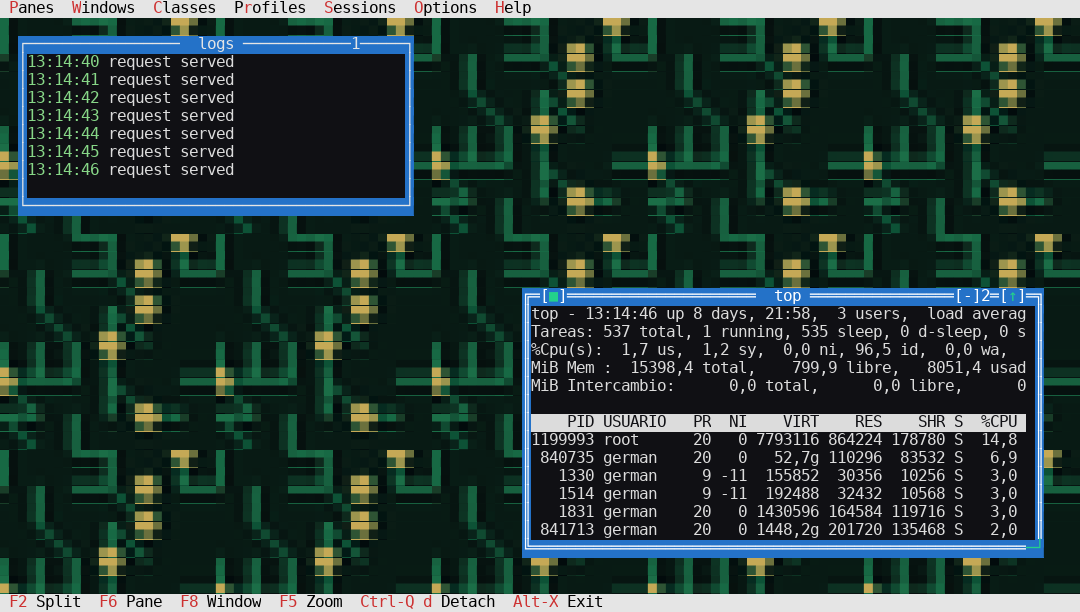
Cuatro ventanas comparten el escritorio. Ctrl-Q f toma el panel enfocado y le entrega el terminal completo escribiendo sus bytes PTY en crudo, así que una TUI se reajusta con fidelidad total; el mismo acorde devuelve el escritorio con cada ventana donde estaba. El contorno que se expande es la transición opcional [session] zoomanim. Maximizar con [↑] sigue siendo distinto: llena sólo el escritorio y conserva la interfaz de SuperTerm.
Four windows share the desktop. Ctrl-Q f takes the focused pane and hands it the whole terminal by writing raw PTY bytes, so a TUI reflows at full fidelity; the same chord returns to the desktop with every window where it was. The expanding outline is the optional [session] zoomanim transition. Maximising with [↑] remains different: it fills only the desktop and keeps the SuperTerm interface.
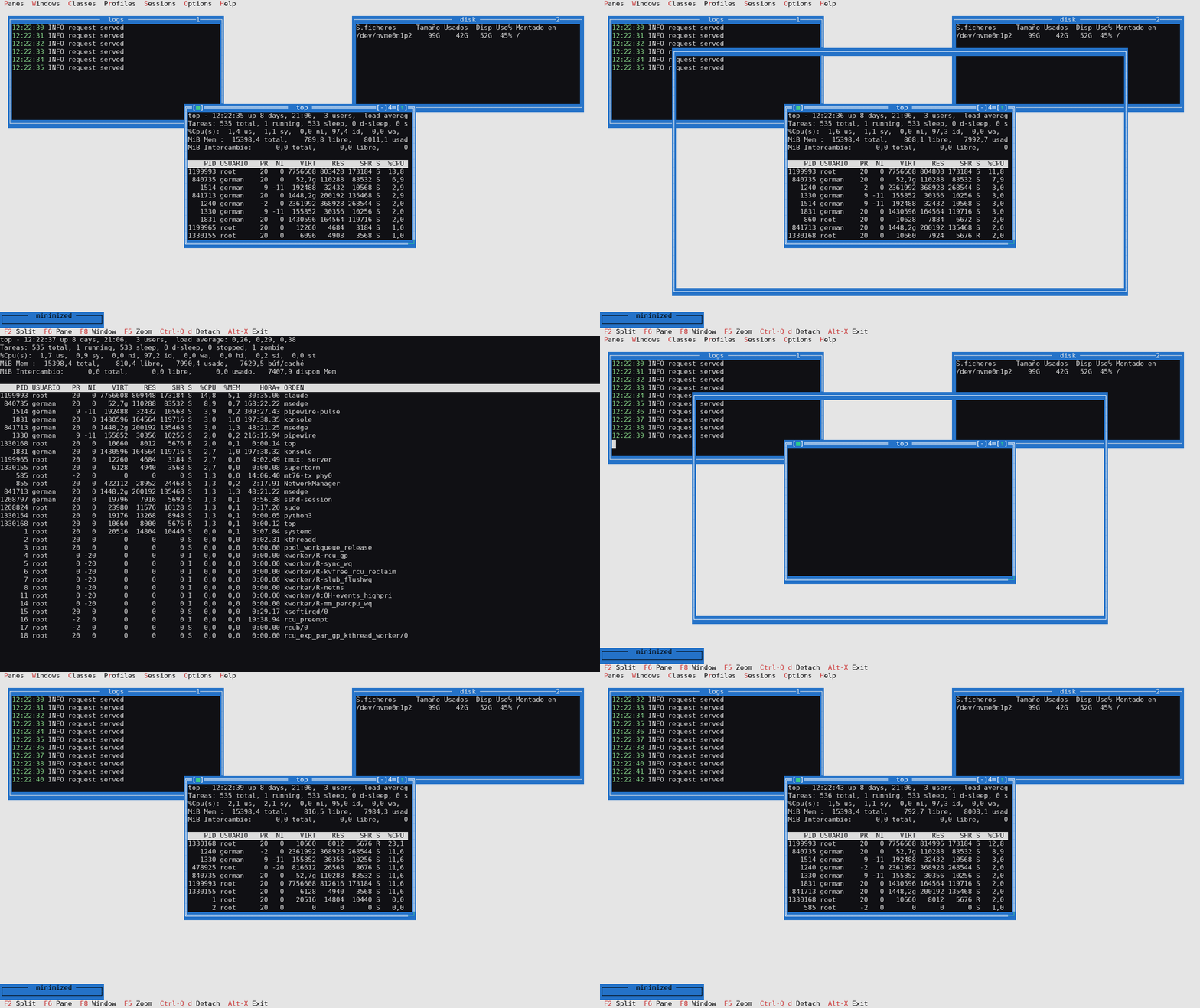
Un panel ya no se aplana a un byte CP437 y 16 colores por celda, ni en mosaico, ni en ventana, ni maximizado. La rejilla de FreeVision sigue decidiendo qué es visible. Hay además dos opciones por perfil: mostrar el contenido al arrastrar y la transición de pantalla completa de Ctrl-Q f. A pane is no longer flattened to one CP437 byte and 16 colours per cell, whether tiled, windowed or maximised. The FreeVision grid still decides what is visible. Two per-profile options remain: show contents while dragging and the Ctrl-Q f fullscreen transition.
superterm es una única base de código multiplataforma que compila y se ejecuta de forma nativa en GNU/Linux, Windows 10 1809+ y macOS (Apple Silicon e Intel). Windows usa la consola nativa ConPTY, no WSL: son nativos el escritorio local, las clases, los perfiles y los paneles SSH salientes. El demonio detached y el listener SSH entrante dedicado siguen siendo POSIX, así que para publicar un escritorio remoto se usa GNU/Linux o macOS como host.
superterm is a single cross-platform codebase that builds and runs natively on GNU/Linux, Windows 10 1809+ and macOS (Apple Silicon and Intel). Windows uses the native ConPTY console, not WSL: the local desktop, window classes, profiles and outgoing SSH panes are native. The detached daemon and dedicated incoming SSH listener remain POSIX-only, so publish a remote desktop from a GNU/Linux or macOS host.
Reserva el pseudoterminal con la secuencia SysV posix_openpt y lee los títulos de proceso de /proc.
Allocates the pseudo-terminal with the SysV posix_openpt sequence and reads process titles from /proc.
Lo reserva con openpty + login_tty de BSD y lee los títulos con libproc/sysctl. Free Pascal define DARWIN solo: no hace falta ninguna opción de compilación.
Allocates it with BSD openpty + login_tty and reads titles with libproc/sysctl. Free Pascal auto-defines DARWIN, so no build flag is required.
Objetivo nativo desde la rama windows-support: ConPTY, Windows Terminal, consola clásica, PowerShell y cmd.exe. Requiere Windows 10 1809 o posterior; el servidor detached y el SSH entrante dedicado siguen siendo POSIX.
Native target from the windows-support branch: ConPTY, Windows Terminal, the regular console, PowerShell and cmd.exe. Requires Windows 10 1809 or later; the detached server and dedicated incoming SSH remain POSIX-only.
La release 5.2.2 publica seis paquetes binarios: GNU/Linux x86_64 (tarball, .deb, .rpm y Arch) y macOS arm64 y universal. Cada paquete tiene su propio .sha256. Windows sigue teniendo soporte nativo ConPTY desde windows-support, pero esta release no publica todavía un instalador Windows; se compila desde el código.
The 5.2.2 release publishes six binary packages: GNU/Linux x86_64 (tarball, .deb, .rpm and Arch) plus macOS arm64 and universal. Every package carries its own .sha256. Windows still has native ConPTY support from windows-support, but this release does not publish a Windows installer yet; build it from source.
# Arch and derivatives
$ sudo pacman -U superterm-5.2.2-1-x86_64.pkg.tar.zst

# Debian / Ubuntu
$ sudo apt install ./superterm_5.2.2_amd64.deb

# Fedora / RHEL / openSUSE
$ sudo dnf install ./superterm-5.2.2-1.x86_64.rpm

# any GNU/Linux — portable tarball, checked against its .sha256
$ sha256sum -c superterm-5.2.2-gnu-x86_64.tar.gz.sha256
$ tar xzf superterm-5.2.2-gnu-x86_64.tar.gz && ./superterm-5.2.2/superterm

# macOS Apple Silicon (a universal tarball is available too)
$ shasum -a 256 -c superterm-5.2.2-macos-arm64.tar.gz.sha256
Al actualizar desde una versión antigua, cierra primero las sesiones vivas con superterm list y superterm kill NOMBRE: el protocolo, la geometría compartida y la seguridad del demonio han evolucionado y los clientes incompatibles se rechazan expresamente. La configuración, los perfiles y las claves del servicio SSH se conservan.
When upgrading from an old release, close live sessions first with superterm list and superterm kill NAME: the protocol, shared geometry and daemon security have evolved, and incompatible clients are explicitly rejected. Configuration, profiles and dedicated SSH service keys are preserved.
El proyecto incluye un configure POSIX autocontenido — no está generado por GNU Autoconf. Detecta el compilador y las herramientas de test, y crea el Makefile a partir de Makefile.in.
The project includes a self-contained POSIX configure script — it is not generated by GNU Autoconf. It detects the compiler and test tools, then creates the Makefile from Makefile.in.
$ git clone https://github.com/garacil/superterm.git
$ cd superterm
$ ./configure
$ make release        # optimized binary -> bin/superterm  (fpc -O4)
$ ./bin/superterm
En Debian o Ubuntu las dependencias se pueden instalar explícitamente con ./configure --install-deps. En macOS, Free Pascal se instala con Homebrew (brew install fpc); libsqlite3 ya viene con el sistema y los comandos son idénticos. make info muestra el compilador, el destino, el prefijo y las rutas elegidas.
On Debian or Ubuntu the dependencies can be installed explicitly with ./configure --install-deps. On macOS, install Free Pascal with Homebrew (brew install fpc); libsqlite3 ships with the system and the commands are identical. make info shows the selected compiler, target, prefix and paths.
# useful configure options
$ ./configure --prefix="$HOME/.local" --sysconfdir="$HOME/.config/superterm"
$ ./configure --with-fpc=/usr/local/bin/fpc
$ ./configure --with-python=/usr/bin/python3

# debug build -> bin/superterm-debug  (-O1 -g -gl -dDEBUG)
$ make debug

# regression suite (isolated PTYs; never touches your tmux server)
$ make test
Free Pascal Compiler 3.2.2 o una versión 3.x compatible · unidades FV, FCL y DB de Free Pascal · GNU make · GNU/Linux/macOS POSIX o Windows 10 1809+ con ConPTY.
Free Pascal Compiler 3.2.2 or a compatible Free Pascal 3.x release · Free Pascal FV, FCL and DB units · GNU make · GNU/Linux/macOS POSIX or Windows 10 1809+ with ConPTY.
Python 3, pyte y Pillow. La suite cubre paneles, ratón, perfiles, restauración, escritorio compartido multicliente, carreras de creación, clientes atascados, backpressure, identidad de procesos y un listener OpenSSH real en un entorno privilegiado aislado.
Python 3, pyte and Pillow. The suite covers panes, mouse input, profiles, restoration, the shared multi-client desktop, creation races, stalled clients, backpressure, process identity and a real OpenSSH listener in an isolated privileged fixture.
openssh-client para paneles remotos y clientes entrantes. Windows Terminal y el cliente OpenSSH estándar de Windows pueden ver un host GNU/Linux/macOS; publicar el escritorio con ssh-server setup requiere un sshd POSIX y crea una instancia dedicada, sin tocar el servicio normal.
openssh-client for remote panes and incoming clients. Windows Terminal and the standard Windows OpenSSH client can view a GNU/Linux/macOS host; publishing the desktop with ssh-server setup needs a POSIX sshd and creates a dedicated instance without touching the normal service.
$ ./bin/superterm --attach            # one session: direct; several: picker
$ ./bin/superterm --attach dev        # attach by name
$ ./bin/superterm list                # sessions table (also --list-sessions)
$ ./bin/superterm --session prod       # name the session created at launch
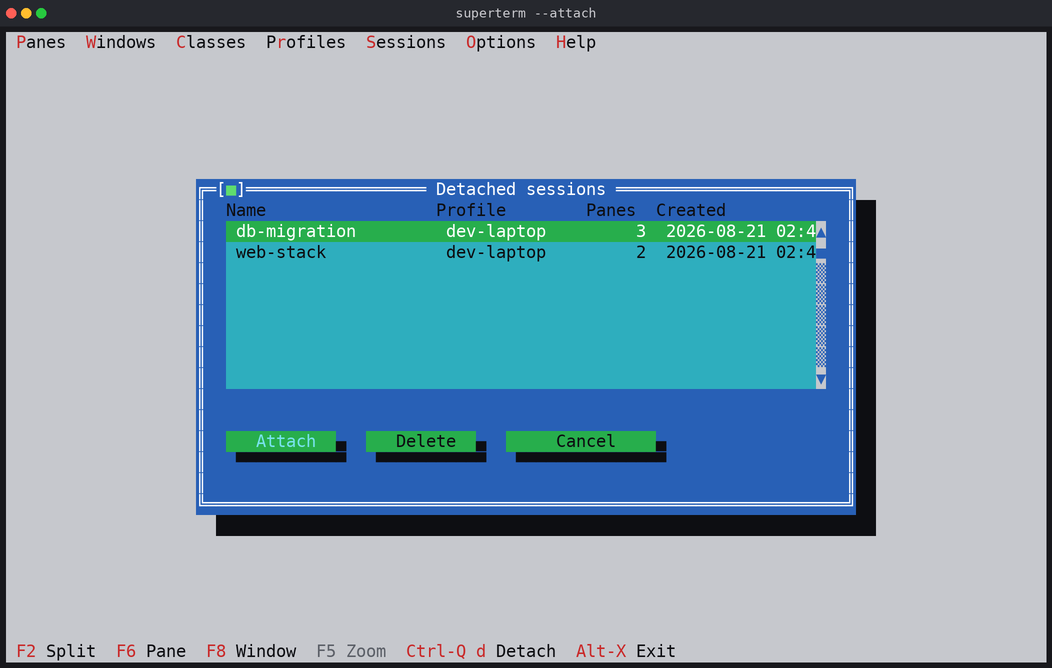
Cada arranque levanta un servidor de sesión por usuario en ~/.superterm/sessions/<nombre>.sock con un fichero de metadatos <nombre>.ini. El servidor es el dueño de los maestros de PTY, los grupos de procesos, los analizadores de terminal y el scrollback, así que dejar el cliente — o perderlo — no cierra las shells locales ni las conexiones SSH remotas. Alt-X y Alt-Q son salidas permanentes — Alt-X pide al servidor que guarde session.ini primero y Alt-Q se salta el guardado —, pero desde la 3.5.1 son locales de tu cliente mientras haya otros conectados: el último que se va es el que cierra la sesión. El matar de la CLI sigue afectando a la sesión entera.
Every launch starts a per-user session server at ~/.superterm/sessions/<name>.sock with a <name>.ini metadata sidecar. The server owns the PTY masters, process groups, terminal parsers and scrollback, so leaving the client — or losing it — does not close local shells or remote SSH connections. Alt-X and Alt-Q are permanent exits — Alt-X asks the server to save session.ini first, Alt-Q skips saving — but since 3.5.1 they are local to your client while others are attached: the last one to leave is what closes the session. The CLI's kill is still session-wide.
superterm está escrito en Free Pascal a propósito. Es una decisión concreta de este proyecto, no una afirmación de que Pascal sea universalmente mejor que C.
superterm is intentionally written in Free Pascal. This is a project-specific tradeoff, not a claim that Pascal is universally better than C.
Una reescritura completa en C tendría que rehacer la interfaz, el manejo de PTY, el analizador VT, el layout, la persistencia de sesión y los tests sin aportar un beneficio concreto para los requisitos actuales — incluidos el servidor de sesión multicliente persistente y la CLI de control bilingüe, ambos implementados en Pascal y cubiertos por la suite de regresión. Las fuentes locales de FreeVision están en vendor/fv322, con arreglos de pantalla ancha y de ratón para tmux; la instalación de FreeVision del sistema no se modifica.
A complete C rewrite would have to recreate the UI, PTY handling, VT parser, layout, session persistence and tests without providing a concrete benefit for the current requirements — including the persistent multi-client session server and the bilingual control CLI, both implemented in Pascal and covered by the regression suite. Local FreeVision sources live in vendor/fv322, including wide-screen and tmux mouse fixes; the system FreeVision installation is not modified.
.deb, .rpm, Arch y tarballs, con su .sha256..deb, .rpm, Arch and tarball packages, each with its .sha256.
WikiLa documentación completa: instalación, uso, CLI, configuración, arquitectura y resolución de problemas.The full documentation: installation, usage, CLI, configuration, architecture and troubleshooting.
Wiki · InstallationPaquetes, compilación, actualización y test.Packages, building, upgrading and testing.
Wiki · UsageEl día a día: paneles, ventanas, sesiones y atajos.Day to day: panes, windows, sessions and shortcuts.
Wiki · ConfigurationClases, perfiles, keymap y opciones, clave a clave.Classes, profiles, keymap and options, key by key.
Wiki · ArchitectureCómo encajan el cliente, el servidor de sesión y el motor VT.How the client, the session server and the VT engine fit together.
Wiki · TroubleshootingQué mirar cuando algo no responde como debe.What to look at when something misbehaves.
Wiki · ScreenshotsMás capturas, una por característica.More captures, one per feature.
IssuesFallos y peticiones de características.Bugs and feature requests.
LICENSEGNU General Public License v3.GNU General Public License v3.
freepascal.orgEl compilador con el que se construye.The compiler it is built with.
Este sitio no usa cookies. Solo guarda en tu navegador el idioma que elijas y que ya has leído este aviso. Más información. This site uses no cookies. It only stores, in your browser, the language you choose and the fact that you have read this notice. More information.